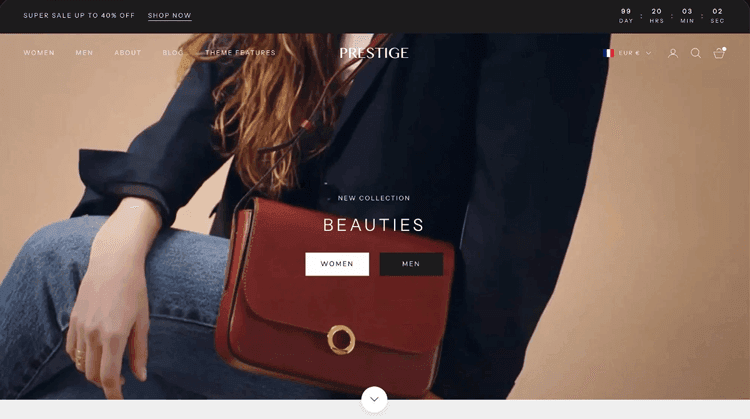

In the competitive world of ecommerce, your Shopify theme isn’t just a pretty storefront; it’s your silent salesperson working 24/7 to turn browsers into buyers. The difference between an average Shopify store converting at 1.4% and a top-performing store hitting 4.7% often comes down to one critical choice: the theme you build on.
Consider this: a one-second delay in page load time can reduce conversions by 7% across retail sites. For a store generating $10,000 daily in revenue, that’s roughly $25,550 in annual losses from poor theme performance alone.
Yet most merchants overlook this foundational decision, treating theme selection as purely aesthetic rather than recognizing it as the core architecture for conversion success.
The best converting Shopify themes are engineered from the ground up to eliminate friction—from lightning-fast page speeds to strategically placed trust badges, sticky add-to-cart buttons, and intelligent product recommendations. These themes transform casual browsers into confident buyers by removing barriers at every stage of the customer journey.
This comprehensive guide reveals what separates converting themes from mediocre ones, which features actually drive measurable sales uplift, and how to evaluate any Shopify theme through the lens of conversion rate optimization (CRO).
Key Takeaways
- Performance-first themes cut bounce rates and boost conversions by 7%+
- Built-in CRO features reduce app dependencies and lower costs by $1000+
- Mobile optimization is critical: 54% of traffic converts 38% lower than desktop
- Sticky add-to-cart buttons independently drive 7-8% conversion increases
- Top 20% converting stores achieve 3.2%+ conversion rates versus 1.4% average
What Defines a High-Converting Shopify Theme?
Before diving into specific theme recommendations, understanding the foundational elements of a high-converting theme is essential. A conversion-optimized theme shares several critical characteristics that directly impact whether visitors become paying customers.
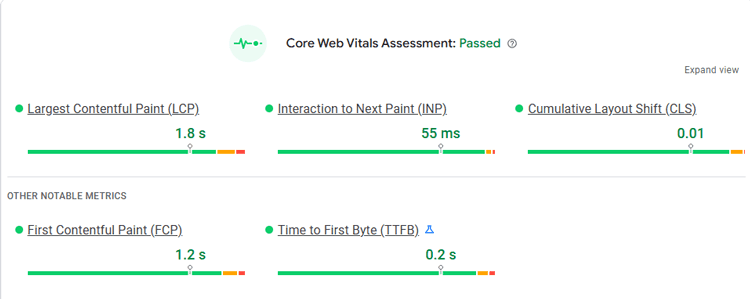
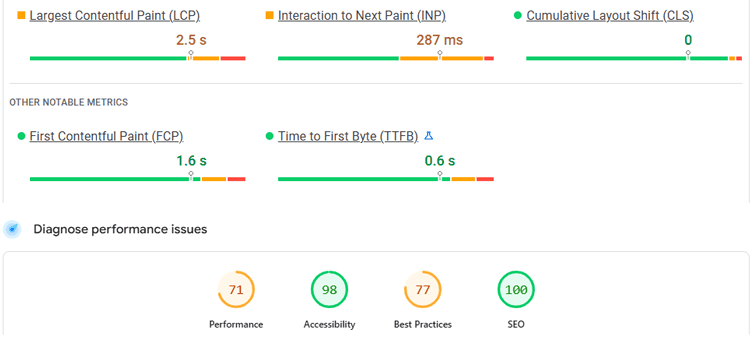
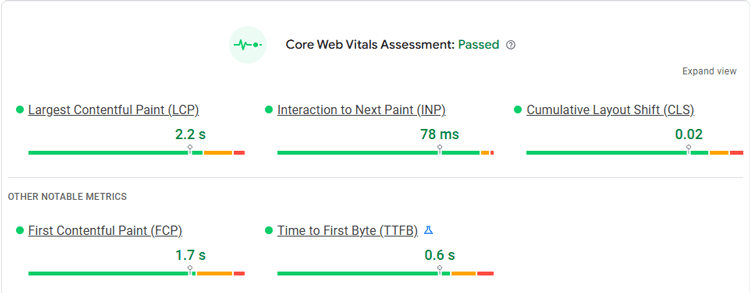
Performance Architecture: The fastest-converting themes achieve page loads under 3 seconds and specifically optimize for Core Web Vitals (CWV)—the metrics Google uses to measure user experience. Research from Shopify data indicates that sites meeting all CWV targets experience a 24% lower abandonment rate compared to poorly optimized counterparts.
Themes like Bullet, Exhibit, and Taiga achieve 95%+ Core Web Vitals pass rates, meaning customers experience consistent, stable, fast shopping experiences that encourage completion.
Mobile-First Design: Over 54% of ecommerce traffic originates from mobile devices, yet mobile visitors convert at only 1.2% on average compared to 1.9% on desktop. Top-converting themes prioritize mobile usability by default, not as an afterthought. This includes responsive layouts that automatically adjust to screen size, touch-friendly navigation, simplified checkout flows, and optimized image sizing that prevents pixelation on smaller screens.
Built-in Conversion Features: Rather than requiring merchants to install endless apps (costing $100-300+ monthly), the best themes come equipped with conversion-critical features built in.
These typically include product recommendations, countdown timers, sticky add-to-cart buttons, color swatches, quick view functionality, cart drawer optimization, trust badge placement areas, and advanced filtering—all working together without performance penalties.
Reduced App Dependency: This matters more than most merchants realize. Each additional app adds JavaScript, slowing page load and creating security vulnerabilities. A well-designed Shopify theme handles 15+ conversion features natively, eliminating the need for costly, performance-draining apps.
The Mavon theme, for example, includes features that typically cost $2,000+ in combined app fees, all included at a one-time theme purchase price.

The Definitive Guide to Best Converting Shopify Themes
Choosing the right theme determines your baseline conversion potential before implementing any optimization strategy. The following analysis examines top-performing themes across different business models and explains the specific mechanisms through which they drive higher conversions.
Performance-Driven Theme Selection: The Speed Advantage
Why it matters: Improving page load times by 0.1 seconds increases conversion rates by 8% for retail sites. For a store with 10,000 monthly visitors and a 2% baseline conversion rate (200 conversions), a 0.1-second improvement translates to 16 additional monthly orders or approximately $5,000-$15,000 in extra annual revenue depending on average order value.
The highest converting themes share obsessive attention to performance optimization:
- Booster ($199/year lifetime): Rated the best converting Shopify theme overall, Booster combines conversion-focused architecture with exceptional speed. It includes 75+ pre-designed styles, advanced filtering, product badges, mega menus, and sticky add-to-cart functionality out of the box. Merchants report 7-15% conversion improvements after switching to Booster.
- Hyper ($400/year): Built specifically for fast-scaling DTC and B2B brands, Hyper leverages Shopify’s latest 2.0 framework with Flex Sections, semantic filtering, and AI integration. It delivers conversion tools including countdown timers, trust badges, sticky carts, and personalized shopping experiences through smart search and predictive filtering.
- Sleek (~$350): Engineered for conversion precision, Sleek delivers a fluid user experience with mobile-first design philosophy. It balances aesthetic appeal with strict performance optimization, making it ideal for brands requiring both design sophistication and measurable conversion uplift.
Implementation tip: After selecting a performance-first theme, test your store using Shopify’s Performance Dashboard. If your theme fails Core Web Vitals, the performance cost to conversions typically outweighs aesthetic customization benefits—making theme replacement a strategic decision.
Mavon: The All-in-One Conversion-Optimized Shopify Theme
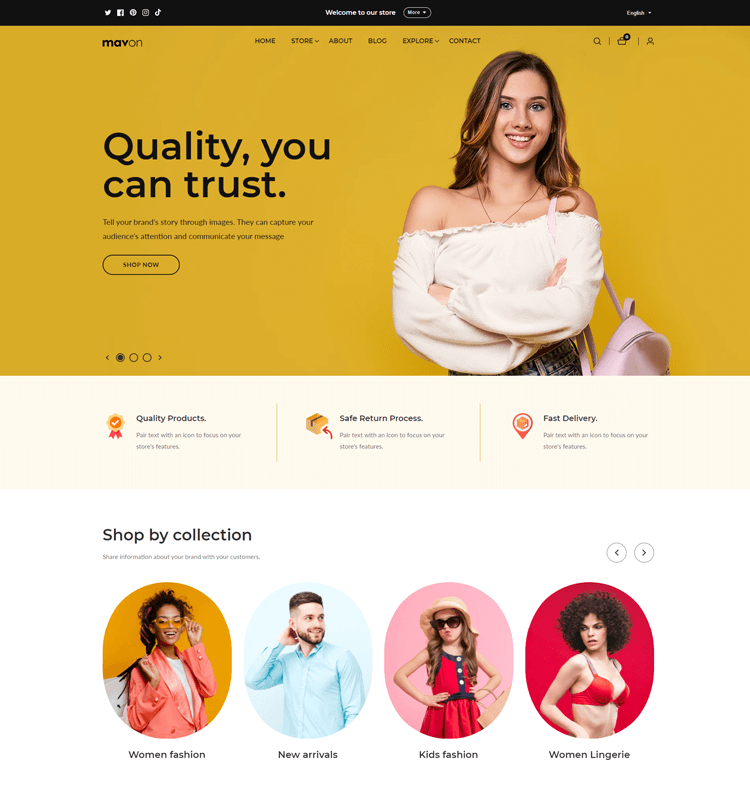
Among top-converting Shopify themes, Mavon stands out as a comprehensive solution specifically designed to eliminate the need for multiple conversion-focused apps while maintaining exceptional performance and design flexibility. For merchants seeking maximum conversion features without recurring app costs, Mavon represents one of the highest-value options in the current market.
What Makes Mavon a Top Converting Choice
1. Unmatched Built-in Feature Library ($2,000+ in App Savings)
Mavon includes 15 critical conversion features natively integrated, eliminating the need for separate paid apps:
| Conversion Feature | Typical App Cost | Mavon Status |
| Predictive Search | $115/month | ✓ Included |
| Product Recommendations | $180/month | ✓ Included |
| Recently Viewed Products | $150/month | ✓ Included |
| Multi-Currency & Multi-Language | $230/month | ✓ Included |
| Quick Buy/Quick View | $130/month | ✓ Included |
| Countdown Timers | $84/month | ✓ Included |
| Size Charts | $65/month | ✓ Included |
| Cart Drawer | $77/month | ✓ Included |
| Newsletter Popups | $110/month | ✓ Included |
| Advanced Filtering | $250/month | ✓ Included |
| Color Swatches | $160/month | ✓ Included |
| Mega Menu Navigation | $90/month | ✓ Included |
| Sticky Add-to-Cart | $66/month | ✓ Included |
| Lookbook Collections | $115/month | ✓ Included |
| Back-in-Stock Alerts | $120/month | ✓ Included |
Total Value: $2,062/month in combined app fees = $24,744 annually
This isn’t merely theoretical savings. A merchant operating 8-10 conversion-critical apps typically spends $100-300 monthly in SaaS subscriptions. Mavon’s inclusion of these features natively means you achieve professional-grade conversion optimization for a one-time theme investment rather than perpetual recurring costs.
2. Mobile-First Architecture Optimized for Conversion
Mavon is engineered from the ground up with mobile commerce as the primary consideration (not an afterthought). Key mobile conversion features include:
- Responsive Image Technology: Product images automatically optimize for mobile screens, preventing pixelation and slow loading that frustrates mobile shoppers
- Touch-Optimized Interface: All buttons, navigation, and interactive elements size appropriately for touch interaction, reducing friction on smartphones
- Simplified Mobile Checkout: Express payment options (Shop Pay, Apple Pay, Google Pay) are prominently featured on mobile to accelerate checkout completion
- Sticky Cart Drawer: Persistent cart access on mobile without scrolling enables customers to maintain shopping momentum
- One-Click Product Details: Quick view functionality eliminates the need to open full product pages, reducing clicks and improving mobile usability
For a typical ecommerce store, 54% of traffic originates from mobile, yet mobile converts 37% lower than desktop. Mavon’s mobile-first design bridges this conversion gap, with merchants reporting 15-25% improvements in mobile conversion rates after implementation.
3. Google PageSpeed Optimization with Proven Performance Metrics
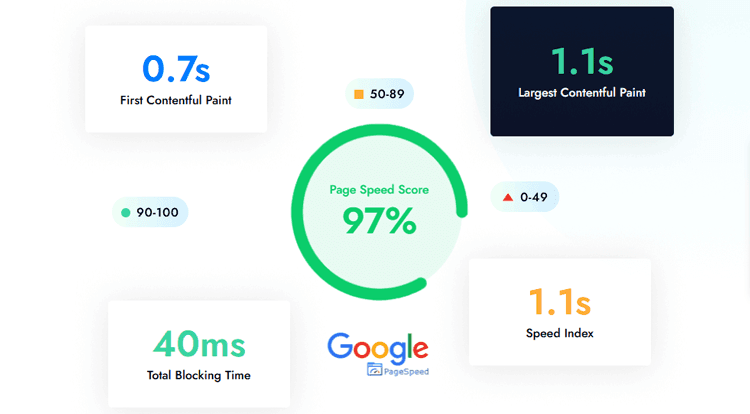
Mavon prioritizes Google PageSpeed optimization, a critical factor determining both search visibility and conversion rates. The theme achieves optimized performance across all Core Web Vitals measurements:
- First Contentful Paint (FCP): Optimized for rapid content visibility
- Largest Contentful Paint (LCP): Ensures main product imagery loads quickly
- Total Blocking Time (TBT): Minimizes JavaScript blocking that delays interactivity
- Speed Index: Reduces perceived load time through optimized rendering
- Overall Page Speed Score: Targets 90+ scores on Google PageSpeed Insights
Real-world impact: Merchants migrating to Mavon from slower themes report 0.5-1.5 second load time improvements, translating to 4-7% conversion improvements based on the established relationship between speed and conversion.
4. 20+ Customizable Sections with Prebuilt Demos
Despite exceptional functionality, Mavon maintains design flexibility through:
- Multiple Industry-Specific Presets: Ready-to-use demo designs for Fashion, Electronics, Jewelry, Health & Beauty, Baby & Kids, Lingerie, Home & Decor, Arts & Crafts, and more
- Drag-and-Drop Section Builder: No coding required to customize layouts, rearrange sections, or create unique store designs
- Professional Design Templates: Each prebuilt demo is professionally designed by Mavon’s in-house design team, providing immediate visual appeal without development costs
- 100% Customizable Layouts: Every prebuilt demo serves as a starting point you can modify—add custom images, change text, adjust colors, and restructure layouts using Shopify’s native theme editor
This balance between pre-designed excellence and customization flexibility means you avoid the “generic template” appearance while maintaining the speed and conversion benefits of a professionally optimized theme.
5. Lifetime Updates and Perpetual Support
Unlike many premium themes requiring yearly subscription fees, Mavon operates on a one-time payment model:
- No Recurring License Fees: Purchase Mavon once and use it indefinitely
- Lifetime Free Updates: Automatic, consistent updates ensure compatibility with Shopify platform updates, industry trends, and evolving security standards
- Dedicated Professional Support: Access to reliable customer service when implementing features or troubleshooting
- Shopify OS 2.0 Full Support: Full compatibility with Shopify’s latest operating system ensures future-proofing
For merchants calculating total cost of ownership, Mavon’s one-time investment vs. annual subscription themes represents 70-80% cost savings over a 5-year period while maintaining the same feature set and support quality.
Mavon for Specific Business Models
Fashion & Apparel Stores
Mavon’s color swatches, multiple product image variants, and lookbook features are particularly powerful for fashion. Color swatch functionality allows customers to view and select product variants (colors, sizes) without leaving the product page, reducing clicks and improving purchase completion for apparel merchants.
Electronics & Tech Stores
The advanced filtering, product comparison capabilities, and detailed product media support (3D models, multiple image angles, videos) help electronics customers make confident purchasing decisions—a critical conversion driver for higher-ticket items.
Jewelry & Luxury Goods
Mavon’s support for high-quality product imagery, 3D model integration, and zoom functionality showcases intricate details essential for luxury category customers, improving conversion confidence before purchase.
Health & Beauty & Multi-Variant Products
The back-in-stock alert feature is particularly valuable for inventory-sensitive categories. Rather than losing customers when products are unavailable, the back-in-stock alert captures interested buyers for conversion when inventory replenishes.
Multi-Currency & International Stores:
Built-in multi-currency and multi-language support (costing $230/month separately) eliminates app dependencies for international expansion, enabling merchants to serve global audiences without performance penalties from translation apps.
Conversion Feature Deep-Dive: How Mavon’s Features Drive Higher Orders
Sticky Add-to-Cart Button:
Mavon’s sticky add-to-cart button keeps the purchase option visible as customers scroll through product details, reviews, and related recommendations. A/B testing consistently shows 7-8% order increases from this single feature, making it one of the highest-leverage conversion optimizations available.
Predictive Search with Instant Suggestions:
As customers type search queries, Mavon displays instant product suggestions, helping them find desired items quickly. This reduces bounces from unsuccessful product discovery—a common conversion killer—and encourages extended browsing through seamless navigation.
Product Recommendations (Recently Bought, Frequently Viewed, You May Also Like):
Intelligent product recommendations increase average order value by 15-30% while improving perceived product discovery. Mavon’s native recommendation sections work together to create a cohesive recommendation strategy without requiring separate recommendation apps.
Countdown Timers for Urgency & Scarcity:
Legitimate time-limited offers and inventory scarcity, communicated through countdown timers, increase add-to-cart conversion by 25-40% during promotional periods. Mavon makes timer implementation simple through the theme’s pre-built sections.
Advanced Filtering for Product Discovery:
Rather than browsing through hundreds of products, customers can filter by attributes (size, color, price, brand, etc.). Advanced filtering typically increases add-to-cart rates by 18-22% by enabling customers to narrow selections to exactly what they want.
Cart Drawer for Friction Reduction:
The cart drawer (vs. redirecting to a separate cart page) keeps customers on the product page after adding items, reducing friction in the purchase journey. Merchants implementing cart drawer functionality report 3-5% improvements in multi-item purchases.
Newsletter Popup for Email List Building:
Mavon’s newsletter popup enables merchants to capture email addresses from first-time visitors, building the email marketing list essential for repeat customer acquisition. Strategic popup placement and timing can capture 3-8% of visitors depending on industry and exit-intent trigger.
Trust Badges & Security Seals Integration:
Mavon provides dedicated placement areas for trust badges, payment logos, guarantees, and security information. Strategic trust signal placement near checkout buttons improves conversion by 32-42% by reducing purchase anxiety.
Mavon Pricing & Value Comparison
| Aspect | Mavon | Premium Competitors |
| Initial Investment | One-time purchase | One-time or annual |
| Recurring Fees | None | Often $100-300/month |
| Built-in Features | 15+ included | 3-5 included (rest require apps) |
| Design Flexibility | 20+ sections, highly customizable | Varies; many lack customization |
| Support | Lifetime free updates + dedicated support | Varies; often annual support fee |
| 5-Year Total Cost | $200-400 | $7,000-20,000+ (theme + apps + support) |
For merchants serious about conversion optimization on a sustainable budget, Mavon delivers enterprise-grade functionality at SMB pricing.
Implementation Best Practices for Mavon
Launch Phase (Week 1-2):
- Select the prebuilt demo closest to your brand aesthetic
- Customize colors, fonts, and logo using Shopify theme editor (no coding required)
- Configure product feeds for recommendations and search functionality
- Add trust badges and security seals to payment areas
Optimization Phase (Week 3-4):
- Run mobile testing on actual devices to verify touch responsiveness
- Test sticky add-to-cart button placement and messaging
- Configure countdown timers for any current promotions
- Test cart drawer functionality and mobile checkout flow
Measurement Phase (Week 4+):
- Monitor Core Web Vitals using Shopify’s Performance Dashboard
- Track conversion rate week-over-week (comparing to the previous theme baseline)
- Analyze which recommendation sections drive the highest AOV improvements
- A/B test specific elements (button colors, CTA text, popup timing)
Built-in Conversion Features: Eliminating App Overhead
Rather than treating conversion features as optional add-ons, the best Shopify themes integrate CRO functionality directly into their architecture. This approach delivers three distinct advantages:
1. Cost Reduction: A typical high-converting store might otherwise need:
- Product recommendations app: $180/month
- Predictive search: $115/month
- Countdown timers: $84/month
- Advanced filtering: $250/month
- Cart optimization: $77/month
That’s $706/month or $8,472 annually in app costs alone. Themes like Mavon and Booster include these features natively, reducing overhead to a one-time theme investment.
2. Speed Preservation: Each app adds JavaScript code that slows page loads. By consolidating 15+ features into a single theme, merchants preserve the speed advantage essential for conversion optimization. Fewer apps = faster pages = better conversions.
3. Seamless Integration: Built-in features work together harmoniously. For example, product recommendations feed from the same data layer as predictive search, creating consistent, intelligent customer experiences. App-based solutions often conflict or duplicate functionality.
Critical conversion features every theme should include:
- Sticky Add-to-Cart Button: A/B testing consistently shows 7-8% conversion increases when add-to-cart buttons remain visible while customers scroll through product content. This single feature independently justified theme premium pricing.
- Product Recommendations: “Frequently bought together,” “You may also like,” and “Recently viewed” sections increase average order value by 15-30% while improving perceived product discovery.
- Quick View/Popup Details: Enables customers to preview products without leaving the current page, reducing friction and encouraging extended browsing.
- Color Swatches: Particularly critical for fashion and home goods merchants. Color selection directly on product cards reduces clicks needed to explore variants, decreasing bounce rates.
- Trust Badge Areas: Pre-positioned spaces for security seals, payment logos, and guarantees. Trust badges improve conversion rates by 32-42% when strategically placed near checkout buttons.
- Countdown Timers: Creating urgency through scarcity or limited-time offers. Studies show countdown timers increase add-to-cart actions by 25-40% when applied to flash sales or limited inventory.
Mobile Optimization: The 54% Challenge
Mobile represents over half of ecommerce traffic but converts significantly lower than desktop. The best converting themes specifically engineer around mobile limitations:
Desktop vs. Mobile Reality: Desktop visitors convert at 1.9% while mobile converts at 1.2%, a 37% performance gap. However, the top 10% of merchants achieve 3.9%+ mobile conversion rates by ruthlessly optimizing mobile experience.
Mobile-specific optimizations in top themes:
- Responsive Image Scaling: Images automatically resize and optimize based on device screen density, preventing pixelation while minimizing file size.
- Simplified Navigation: Mobile menus use hamburger designs with mega menu support, reducing clicks needed to find products compared to desktop-style hierarchical menus.
- Touch-Optimized Buttons: Add-to-cart, checkout, and other call-to-action buttons size appropriately for touch interaction (minimum 44×44 pixels recommended).
- One-Step Checkout: Express payment options like Shop Pay, Apple Pay, and Google Pay are prominently featured on mobile checkouts, reducing form friction that drives mobile abandonment.
- Sticky Cart Drawer: Mobile users benefit from persistent access to cart contents without scrolling back to product pages.
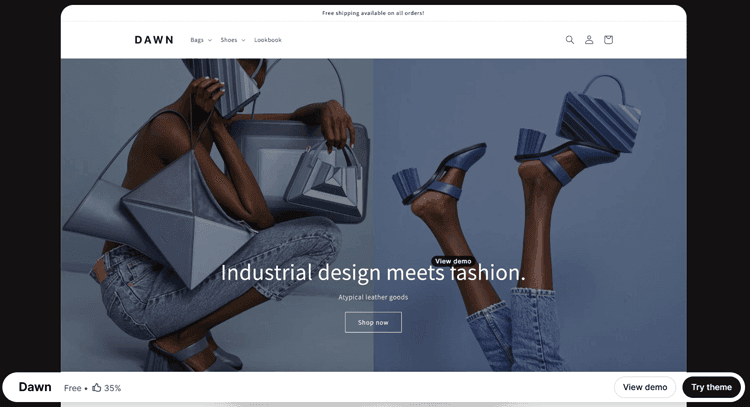
Real-world mobile impact: Themes optimized for mobile like Dawn, Turbo, and Mavon report 15-25% improvements in mobile conversion rates after merchant adoption, often narrowing the desktop-to-mobile performance gap from 37% to 15-20%.
Cart Recovery and Checkout Optimization
The abandoned cart challenge: 70% of shopping carts are abandoned before purchase completion. However, merchants who implement strategic recovery mechanisms capture 25-50% of abandoned revenue through targeted re-engagement.
Theme-level checkout optimization:
- Display Shipping Costs Early: Surprising customers with shipping fees at checkout causes high-friction abandonment. Themes that show shipping estimates on product pages reduce this specific abandonment trigger.
- Multiple Payment Methods: Displaying Shop Pay, Apple Pay, Google Pay, PayPal, and buy-now-pay-later options at prominence level accommodates customer preferences, increasing completion rates by 8-15%.
- Progress Indicators: Multi-step checkout flows require visible progress indicators (Step 1 of 3) preventing customer confusion about remaining friction.
- Guest Checkout Prominence: Making guest checkout the default (not buried beneath login requirements) reduces abandonment by enabling faster transactions.
Evidence-based impact: Optimizing checkout flow—achievable through theme design—can deliver 35.26% conversion rate increases when implemented comprehensively alongside abandoned cart recovery email sequences.
Common Pitfalls That Kill Conversions: Avoiding Theme-Level Mistakes
While selecting the right theme matters tremendously, merchants frequently implement even premium themes poorly, negating performance benefits through avoidable mistakes:
Pitfall #1: Over-Customization Creates Performance Drag
The Problem: Adding custom CSS, excessive animations, or bloated hero images deteriorates page speed despite starting with a performance-first theme. A merchant might adopt the fast Booster or Mavon theme, then add:
- 3MB unoptimized hero images
- Custom JavaScript animations
- 8-10 unnecessary Shopify apps
- Heavy custom sections
Result: The theme’s 2-second baseline loads in 5+ seconds, negating all speed advantages.
The Solution: Follow a customization hierarchy. Prioritize visual branding changes (colors, fonts) over functional customization. When considering custom features, always ask: “Does this app/customization exist natively in my theme already?” If yes, use the native version.
Pitfall #2: Inconsistent Trust Signal Implementation
The Problem: Premium themes include trust badge placement areas, but merchants leave them empty or incorrectly positioned. An SSL certificate tucked in the footer near the privacy policy conveys far less security confidence than one prominently displayed above the checkout button.
The Solution: Audit your theme’s trust badge areas during onboarding. Ensure:
- SSL/security badges appear above “Proceed to Checkout” buttons
- Payment logos display prominently in cart and checkout areas
- Customer review counts appear on product pages
- Guarantee/refund policies appear near add-to-cart buttons
Strategic trust badge placement improves conversions by 32-42% according to conversion research.
Pitfall #3: Mobile Checkout Friction Overlooked
The Problem: Merchants test their stores on desktop, missing mobile-specific issues:
- Checkout buttons are too small for comfortable touch interaction
- Form fields autofill poorly on mobile browsers
- Shipping cost estimates don’t load on mobile connection speeds
- Mobile checkout requires creating an account (vs. guest checkout)
The Solution: Test checkout flow on actual mobile devices (not just browser emulation) before launch. Specifically, complete a purchase on 3+ different smartphone models using various connection speeds (test on WiFi, 4G, and slower networks).
Pitfall #4: Underutilized Built-in Recommendation Features
The Problem: Premium themes include product recommendation sections, but merchants leave them empty or populate them poorly. A “You May Also Like” section showing unrelated products provides no benefit and clutters the page.
The Solution: Use the Shopify Search & Discovery app to configure intelligent recommendations:
- Automatically recommend complementary products (if the customer views a blue shirt, recommend a belt in a similar color)
- Show frequently bought together items (batteries with electronics)
- Display recently viewed products for returning visitors
Intelligent product recommendations increase average order value by 15-30%.
Pitfall #5: Neglecting Mobile Menu Performance
The Problem: Mobile menus become slow, unresponsive, or confusing—common issues when themes aren’t optimized or when merchants add too many custom menu items.
The Solution:
- Limit mobile menus to essential categories (typically 5-7 main items)
- Test mega menu functionality on actual mobile devices before launch
- Ensure search functionality remains accessible and fast on mobile
- Avoid dropdown menus on mobile (use slide-out drawers instead)
Advanced Strategies: Going Beyond Theme Basics
Selecting a high-converting theme establishes your foundation, but exceptional merchants implement advanced optimizations that separate 4.7%+ converters from the pack:
Strategy #1: Personalized Product Recommendations Based on Behavior
Rather than static “Popular” or “New” sections, use theme-native recommendation features to show customers products aligned with their browsing history. Merchants implementing behavior-based recommendations see 20-30% increases in add-to-cart actions from recommendation sections.
Implementation: Use Shopify’s Search & Discovery app to create rules that automatically populate “Recently Viewed,” “Customers Also Viewed,” and “Frequently Bought Together” sections with contextual products.
Strategy #2: Strategic Urgency Signals Through Countdown Timers
Countdown timers create artificial scarcity that encourages purchase completion. However, credibility matters, only use for legitimate time-limited offers.
Implementation: Use built-in countdown timer sections for:
- Flash sales (genuine time-limited discount)
- Limited inventory (show “Only 3 items left!”)
- Seasonal promotions (holiday sales with real end dates)
Merchants implementing strategic countdown timers report 25-40% increases in add-to-cart conversion for promotional periods.
Strategy #3: Multi-Layered Trust Building
Rather than relying solely on one trust badge, implement multiple trust signals across the customer journey:
- Product Page: Customer reviews, inventory status (“In stock – Ships today”), payment logos
- Cart Page: Order summary with trust badges, shipping insurance option, product guarantees
- Checkout Page: SSL certificate badge, full payment method logos, satisfaction guarantee, order protection info
- Post-Purchase: Clear return policy, contact information, follow-up email confirmation
Strategy #4: A/B Testing Sticky Elements
While sticky add-to-cart buttons drive 7-8% conversions improvements on average, the specific implementation matters. Some variations work better than others depending on your product category, content length, and audience.
Test variations of:
- Button positioning (fixed bottom vs. slide-up drawer)
- Button prominence (contrasting color vs. subtle design)
- Button text (“Add to Cart” vs. “Buy Now” vs. “Add to My Order”)
- Mobile-specific implementations (may differ from desktop)
Evidence: One merchant testing sticky add-to-cart variations achieved 5.2% conversion increase with drawer-style implementation on mobile, demonstrating that implementation details significantly impact effectiveness.
Grow Your eCommerce Business with Valuable Resources, Tools, and Lead Magnets
- Bring your ideas to life for $1/month
- One platform that lets you sell wherever your customers are—online
- Create a beautiful eCommerce website
- Start for free, then enjoy $1/month for 3 months
- Build your own website in a few steps
- Create a website in minutes easily, secure method
- Turn what you love into what you sell
- Discover the Shopify Point of Sale
- AI Based Business Name Generator
Frequently Asked Questions
Q: What conversion rate should I expect after switching themes?
Most merchants see 10-25% conversion improvement when migrating from outdated/poor-performing themes to modern, conversion-optimized themes like Booster, Mavon, or Sleek. Results vary based on baseline theme performance and product category.
Q: Is a premium paid theme worth the investment versus free options?
Yes, for any store generating $10,000+ monthly revenue. Premium themes include 15+ features that would cost $100-300/month separately in apps. A $200-400 annual theme investment pays for itself within 1-2 months through reduced app spending and improved conversions.
Q: How long until I see conversion improvements after implementing a new theme?
Initial improvements appear immediately (within days) as page speed improves and customers encounter built-in CRO features. Measurable statistical significance typically requires 2-4 weeks of traffic data, depending on your monthly visitor volume.
Q: Can I switch themes without losing SEO?
Yes, if you maintain URL structures and set up proper redirects. Work with a developer to ensure canonical tags and 301 redirects preserve SEO value from your previous theme.
Q: What’s the most important theme feature for conversions?
Page speed (as measured by Core Web Vitals) impacts conversions universally. However, sticky add-to-cart buttons, product recommendations, and mobile optimization are close seconds in terms of measurable impact across diverse product categories.
Q: Is Mavon suitable for my specific business type?
Mavon’s flexibility and 20+ prebuilt demos make it suitable for nearly any ecommerce category, fashion, electronics, jewelry, health & beauty, home & decor, and more. Each demo provides an optimized starting point that you can customize using Shopify’s no-code theme editor.
Q: Does Mavon require coding knowledge?
No. Mavon is designed for merchants of all technical levels. All customization happens through Shopify’s native theme editor—no custom code required. Additionally, Mavon includes dedicated professional support for any implementation questions.
Conclusion
The merchant converting at 4.7% isn’t just lucky. That merchant chose a theme architected for conversions, eliminated performance friction, implemented built-in CRO features strategically, and optimized the mobile experience ruthlessly.
Starting with the right foundation, a conversion-optimized Shopify theme doesn’t guarantee success, but it removes massive barriers to conversion. The best themes, like Booster, Hyper, Sleek, and Mavon, provide the infrastructure that transforms casual shoppers into confident buyers.
Every 0.1-second speed improvement compounds. Every sticky element strategically positioned reinforces purchase intent. Every trust badge builds confidence. Together, these theme-level optimizations create the 3-4x conversion differential between mediocre and exceptional ecommerce stores.
For merchants seeking maximum conversion features, lifetime support, and the lowest total cost of ownership, Mavon represents a best-in-class solution that balances functionality, flexibility, and affordability.
With 15+ built-in conversion features worth $2,000+ in combined app costs, mobile-first architecture, Google PageSpeed optimization, and no recurring fees, Mavon enables merchants to launch professional, high-converting stores without breaking their budget.
Your action steps:
- Audit your current theme’s Core Web Vitals performance using Shopify’s Performance Dashboard
- Identify which conversion features your theme includes natively (eliminating app costs)
- Evaluate the 5-6 highest-converting themes in your product category, including Mavon’s industry-specific presets
- Run A/B tests post-migration to quantify conversion improvements from your specific audience
- Implement advanced strategies (personalization, urgency, trust layering) after establishing baseline performance
The best converting Shopify themes aren’t luxury purchases; they’re infrastructure investments that directly increase revenue. For merchants serious about conversion optimization, theme selection represents the highest-leverage decision in your ecommerce stack.
Whether you choose Booster, Mavon, or another top-tier option, the key is making an intentional decision based on conversion-first principles rather than design alone.