

Running a successful Shopify store in 2026 requires more than great products, you need the right Shopify app stack. With thousands of apps in the Shopify App Store, choosing the best Shopify apps for your eCommerce store feels overwhelming.
This guide cuts through the noise. We’ll show you 15 essential Shopify apps that work in real stores, explain when to install each one, and help you build a starter stack versus a scaling stack.
How to Build Your Shopify App Stack
Most new store owners install too many apps at once. Here’s a better approach:
Step 1: Start with Core Functions (Week 1)
Install apps that cover basics:
- Customer support (helpdesk)
- Analytics and tracking (GA4 or similar)
- Email marketing (automated campaigns)
Step 2: Add Trust Signals (Week 2-4)
Once orders start flowing:
- Review collection app
- Wishlist functionality
- SEO tools for visibility
Step 3: Scale with Growth Tools (Month 2+)
When you’re ready to grow:
- Advanced tracking (GTM, pixels)
- Affiliate programs
- Social commerce channels
What to Do Next
Read through each app section below. Mark 3-5 apps that match your current stage, then install and test them one at a time. Monitor your site speed after each install.

Bring your ideas to life for $1/month
The future of business is yours to shape. Sign up for a free trial and enjoy 3 months of Shopify for $1/month on select plans.
Why the Right Shopify Apps Matter
- Save time through automation
- Increase conversions with better customer experience
- Track accurately to optimize marketing spend
- Build trust with reviews and social proof
- Grow revenue without hiring a big team
The key is choosing only what you need. More apps don’t always mean better results—they can slow your store and create complexity.
15+ Essential Shopify Apps for 2026
Analytics & Tracking Solutions
GroPulse GTM & Data Layer
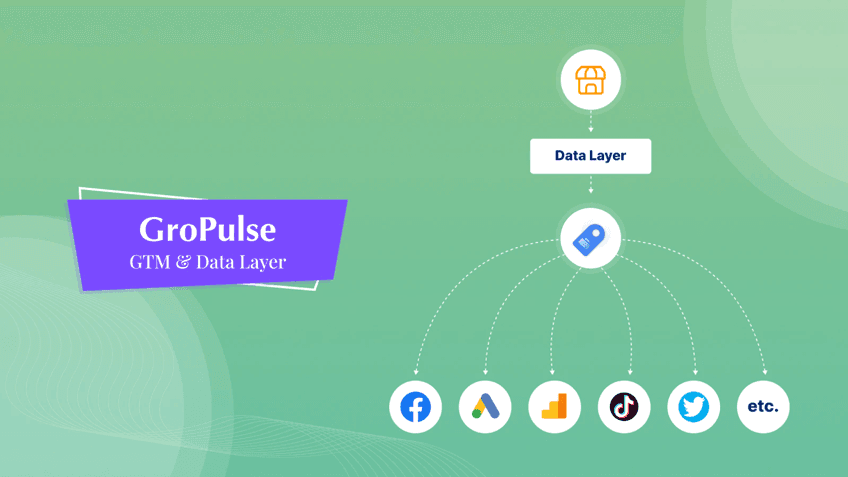
GroPulse GTM & Data Layer connects Google Tag Manager to your Shopify store without coding. It automatically sends ecommerce events (product views, add-to-cart, purchases) to GA4, Meta Pixel, TikTok Pixel, and other platforms through GTM’s server-side tracking.
Best for
- Stores running Meta, Google, or TikTok ads needing accurate conversion tracking
- Merchants who want GTM flexibility without hiring developers
- Growing brands adding multiple marketing pixels
What we like
- One-click GTM container installation with pre-built ecommerce triggers
- Server-side tracking that bypasses ad blockers and iOS restrictions
- Supports multiple pixels and conversion APIs simultaneously
- Clean data layer structure that works with custom tracking needs
Watch out for
- If you have existing GTM tags, you’ll need to audit for duplicates
- Server-side tracking requires Google Cloud account setup
- Advanced customization still needs some GTM knowledge
Real-world example
A fashion brand running Meta and Google ads had 25% tracking discrepancy between ad platforms and Shopify. After installing GroPulse GTM and enabling server-side events, their tracked conversions matched Shopify orders within 5%, helping them confidently optimize ad spend across channels.
Pricing: Free plan available; paid plans start around $7.99/month. Always verify current pricing in the Shopify App Store.
👉Learn More: How to Add Google Tag Manager to Shopify
Analyzely – Google Analytics 4

Analyzely connects your Shopify store to Google Analytics 4 with automatic event tracking for ecommerce actions. You get product views, add-to-carts, checkouts, and purchases flowing into GA4, plus simplified reports inside your Shopify admin.
Best for
- New stores want reliable analytics from day one
- Brands running paid ads need accurate conversion data
- Store owners who find GA4 overwhelming and want simpler dashboards
What we like
- Automatic GA4 setup with measurement ID integration
- Tracks all standard ecommerce events without code
- Prebuilt reports dashboard inside Shopify
- Server-side event options to recover blocked conversions
Watch out for
- Avoid double-tracking if you have manual GA4 setup already
- Simple reporting means advanced analysis still happens in GA4
- Check for duplicate tags when adding other tracking apps
Real-world example
A skincare brand doing 40-60 monthly orders couldn’t trust their GA4 data because it never matched Shopify. After installing Analyzely with server-side tracking, purchase data aligned within 5%, letting them identify which campaigns brought repeat customers and shift budget accordingly.
Marketing & Customer Acquisition
Pixee ‑ Multi Pixel & Meta Ads

Pixee connects Facebook, TikTok, and Pinterest pixels to your Shopify store with server-side tracking for accurate conversion data. It auto-syncs product catalogs for dynamic ads and includes AI-powered diagnostics to analyze Meta ad performance.
Best for
- Stores running Meta, TikTok, or Pinterest ads needing accurate tracking
- Brands managing multiple ad platforms from one dashboard
- Merchants wanting to improve ad ROAS through AI diagnostics
What we like
- Connects multiple pixels (Facebook, TikTok, Pinterest) in one unified dashboard
- Server-side Conversion API tracking bypasses ad blockers and iOS restrictions
- Auto-syncs product catalogs to Meta for dynamic retargeting ads
- AI diagnostics analyze campaigns and provide actionable improvement recommendations
Watch out for
- Free plan limited; unlimited pixels require paid plan at $21/month
- AI diagnostic features require AI Pro plan at $25/month
- Managing multiple platforms still requires understanding each ad system
Real-world example
A beauty brand running Meta and TikTok ads had 30% tracking loss due to iOS privacy changes. After installing Pixee with Conversion API enabled, their tracked conversions improved by 25%, giving them confidence to scale winning campaigns. The AI diagnostic tool identified underperforming audiences, helping them cut wasted spend by $800/month.
Pricing: Free plan available; Basic plan $21/month, AI Pro plan $25/month. Verify current pricing in Shopify App Store.
Shopify Email

Shopify Email is Shopify’s native email marketing tool with drag-and-drop templates, automated campaigns, and built-in customer segmentation. It pulls directly from your Shopify customer data and product catalog.
Best for
- New stores wanting simple email marketing without third-party tools
- Merchants on tight budgets (includes free sends monthly)
- Stores needing quick setup for abandoned cart and promotional emails
What we like
- Native Shopify integration means no setup complexity
- Drag-and-drop builder with branded templates
- Automatic customer segments based on purchase behavior
- Free monthly email sends included
Watch out for
- Limited automation compared to dedicated platforms like Klaviyo
- Basic reporting and A/B testing features
- May need to upgrade to third-party tool as volume grows
Real-world example
A candle store just launched with no email list. Using Shopify Email’s signup form and welcome automation, they grew to 800 subscribers in two months. Their automated abandoned-cart email recovered 12% of carts, generating $2,400 in additional revenue with zero monthly cost.
Pricing: Free with monthly sending limits. Additional sends are available at a low cost.
Sender: Email Marketing & SMS

Sender combines email and SMS marketing with automation workflows, segmentation, and pop-up forms. You can design responsive emails, send promotional SMS, and automate sequences triggered by customer actions.
Best for
- Growing stores ready to add SMS alongside email
- Brands wanting advanced segmentation and personalization
- Stores needing exit-intent popups and lead capture forms
What we like
- Drag-and-drop email builder with mobile-responsive templates
- Combined email + SMS campaigns from one dashboard
- Abandoned cart, welcome, and post-purchase automations
- Signup forms and exit-intent popups included
Watch out for
- SMS credits cost extra beyond free tier
- More features mean a steeper learning curve than Shopify Email
- Need to manage opt-in compliance for SMS marketing
Real-world example
A fitness apparel store added Sender to launch SMS campaigns alongside email. They sent a flash-sale SMS to 1,200 opted-in customers and generated $3,800 in sales within 6 hours. Combined email + SMS workflows increased their repeat purchase rate by 18% over three months.
Pricing: Free plan available; paid plans start at $15/month. Verify current pricing on the Shopify App Store.
Store Enhancement & Customer Experience
GroPulse Wishlist
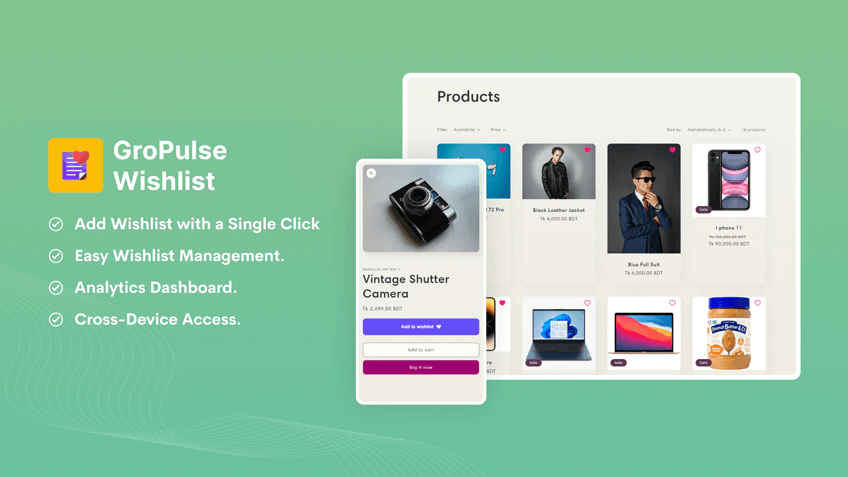
GroPulse Wishlist adds wishlist functionality to your product pages, letting customers save favorite items. It includes guest wishlists, automatic back-in-stock notifications, and wishlist analytics.
Best for
- Stores with higher-priced products where customers compare options
- Fashion, jewelry, or home decor stores with browsing-heavy shoppers
- Merchants want to capture intent before customers leave
What we like
- Works for both guest and logged-in customers
- Automatic email notifications when wishlist items come back in stock
- Simple analytics showing most-wishlisted products
- Free tier with core features included
Watch out for
- Requires theme integration for wishlist button placement
- Email notifications depend on customers providing email addresses
- Analytics are basic compared to paid wishlist apps
Real-world example
A jewelry store added GroPulse Wishlist and discovered their highest-priced items were wishlisted 3x more than purchased. They sent a 10% discount code to wishlist users, converting 22% of them within one week and adding $4,200 in sales from previously hesitant browsers.
Pricing: Free with all essential features.
Judge.me

Judge.me collects and displays unlimited product reviews, photo/video reviews, and star ratings. It automates review requests after fulfillment, syndicates reviews to Google and social media, and imports reviews from Amazon, Etsy, or other platforms.
Best for
- Any store needing social proof to increase conversion rates
- Brands want photo and video reviews from customers
- Stores migrating from another platform and needing to import reviews
What we like
- Unlimited reviews on the free plan, including photos and videos
- Automated review request emails after fulfillment
- Google rich snippets for SEO, syndicates to Google Shopping
- Review import from Amazon, Etsy, Yotpo, Loox, and more
Watch out for
- Free plan has Judge.me branding on widgets
- Some advanced features (carousels, Q&A) require a paid plan
- High review volume may need moderation time
Real-world example
A skincare brand imported 340 reviews from Amazon when launching their Shopify store. After adding Judge.me’s automated requests, they collected 120 new reviews in two months, including 40 photo reviews. Their conversion rate increased from 1.8% to 2.6%, directly attributed to visible social proof on product pages.
Pricing: Free plan with core features; paid plan starts at $15/month for advanced options.
SEO & Store Optimization
GP JSON‑LD Schema for SEO

GP JSON-LD Schema adds structured data (schema markup) to your store so products show rich snippets in Google search—star ratings, prices, availability, and FAQs. It includes AI-powered meta tag and alt text generation.
Best for
- Stores want higher click-through rates from Google search
- Merchants needing structured data without touching code
- Growing stores ready to invest in long-term SEO visibility
What we like
- Automatic JSON-LD schema for products, FAQs, recipes, videos, and local businesses.
- Works with Judge.me, Yotpo, Loox, and other review apps for star ratings
- AI generates alt text and meta tags for products
- Google Search Console integration to track SEO performance
Watch out for
- AI credits limited on free plan; extra credits cost $1 each
- Star ratings in search require active review collection
- Some schema types (FAQ carousels) need manual setup
Real-world example
A home goods store installed GP JSON-LD Schema and enabled product + review schema. Within six weeks, 40% of their product pages showed star ratings in Google search. Click-through rate from search increased from 2.1% to 3.4%, driving 300 additional monthly visitors without increasing ad spend.
Pricing: Free plan includes basic schemas; pro plan starts at $8.99/month with more features.
NoIndexly – Sitemap Manager

NoIndexly manages NoIndex and NoFollow meta tags to prevent duplicate content issues and control which pages search engines index. It helps you keep your XML sitemap clean and can generate an HTML sitemap for better crawlability.
Best for
- Stores with multiple product variants creating duplicate content
- Merchants wanting to hide draft, test, or low-quality pages from Google
- Growing stores needing clean sitemaps for better SEO performance
What we like
- Easy control over NoIndex/NoFollow tags from one dashboard
- Prevents search engines from indexing unwanted pages (cart, checkout, account pages)
- Clean sitemap management improves Google indexation
- User-friendly interface, no coding required
Watch out for
- Free plan covers basic pages; bulk settings require Pro plan at $3.49/month
- Incorrectly applying NoIndex tags can harm SEO if done on important pages
- Changes take time to reflect in search engines (weeks, not days)
Real-world example
An apparel store with 200+ products and dozens of color variants faced duplicate content warnings in Google Search Console. After installing NoIndexly, they applied NoIndex tags to variant URLs and cleaned their sitemap. Within six weeks, Search Console errors dropped by 80%, and organic traffic increased 12% as Google prioritized their main product pages.
Pricing: Free plan available; Pro plan $3.49/month. Verify current pricing in Shopify App Store.
Shopify Search & Discovery
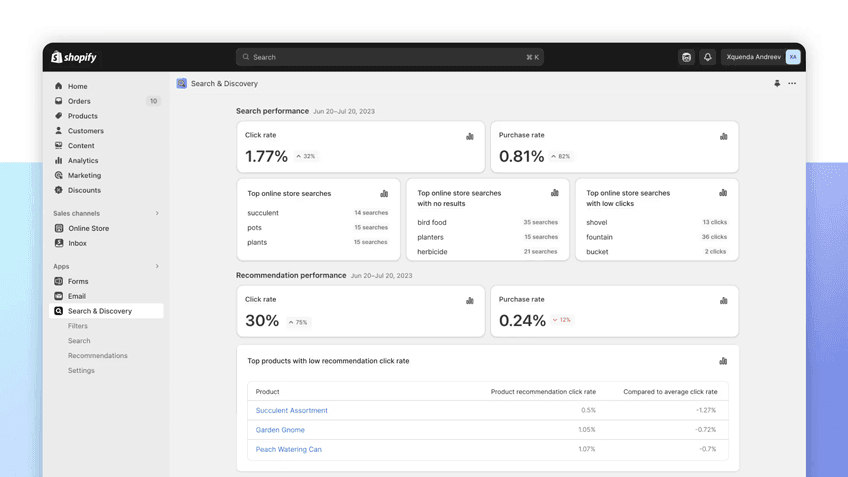
Shopify Search & Discovery is Shopify’s free native app that improves on-site search with smart product recommendations, advanced filters, and search analytics. It includes synonym management and custom ranking.
Best for
- Any store wanting better on-site search without paid apps
- Stores with large catalogs need filtering by size, color, and price.
- Merchants wanting to boost the discovery of related products.
What we like
- Completely free, built by Shopify
- Customizable product filters (size, color, price, tags, metafields)
- Smart search with synonym support (e.g., “sweater” matches “jumper”)
- Product recommendation blocks for related items and cross-sells
Watch out for
- Features are basic compared to premium search apps
- Limited customization of the search result page design
- Analytics are lighter than dedicated search platforms
Real-world example
An outdoor gear store with 800 products enabled Shopify Search & Discovery filters for activity type, season, and price range. Average session duration increased from 1:20 to 2:10 minutes, and “refine by filter” users converted at 4.2% versus 2.1% for non-filter users.
Pricing: Free native Shopify app.
Design & Customization
CodeUp – Add Custom Code

CodeUp is a Shopify essential app for store owners needing custom code implementation. It allows adding CSS, JavaScript, and tracking scripts without coding expertise. This Shopify eCommerce app ensures store flexibility and performance optimization.
Best for
- Stores needing custom styling or tracking beyond theme settings
- Merchants adding third-party scripts (chat widgets, analytics, popups)
- Advanced users wanting page-specific code without theme edits
What we like
- Add CSS and JavaScript without touching theme code
- Load scripts on specific pages, collections, or site-wide
- Tracks code performance and load times
- Safer than editing theme files directly
Watch out for
- Still requires basic HTML/CSS/JavaScript knowledge
- Too many custom scripts can slow page speed
- Custom code may break during theme updates if not tested
Real-world example
A subscription box store used CodeUp to add a custom countdown timer to their limited-edition product page and a trust badge script to checkout. These changes increased urgency and trust signals without hiring a developer, contributing to a 15% conversion lift on the featured product.
Pricing: Free plan available; premium plan around $2.99/month. Check Shopify App Store for current pricing.
Social Media & Marketing Channels
TikTok

TikTok is one of the fastest-growing social media platforms, making it a key marketing tool. This Shopify engagement app enables seamless product synchronization with TikTok Shop. Store owners can create interactive shopping videos and targeted ad campaigns.
Best for
- Brands targeting Gen Z and millennial audiences
- Stores with visually engaging products (fashion, beauty, home decor)
- Merchants ready to create video content for social commerce
What we like
- Free integration with TikTok Shop and TikTok Ads Manager
- Automatic product catalog sync
- Shoppable video tags let viewers buy without leaving TikTok
- Built-in performance tracking in Shopify
Watch out for
- Requires active content creation (videos, trends)
- TikTok Shop has eligibility requirements by region
- Ad costs can scale quickly with testing
Real-world example
A phone accessories brand synced 60 products to TikTok Shop and posted 3 shoppable videos per week. One viral video with 180K views drove 240 TikTok Shop orders in five days, generating $6,800 in revenue with zero paid ad spend.
Pricing: Free integration. TikTok ad spend is separate.
GroPulse Google Reviews

GroPulse Google Reviews imports and displays authentic Google reviews directly on your Shopify store with customizable widgets. It automatically syncs reviews from your Google Business Profile and lets you showcase ratings with multiple layout options.
Best for
- Local businesses with strong Google reviews wanting to display them on their store
- Brands needing social proof beyond just product reviews
- Stores wanting to leverage existing Google reputation for conversions
What we like
- Seamlessly imports Google reviews from your Google Business Profile
- Multiple widget styles (carousel, grid, list) to match store design
- Filter reviews by rating to showcase best feedback
- Free plan includes core review display features
Watch out for
- Requires active Google Business Profile with existing reviews
- Free plan has GroPulse branding on widgets
- Email automation features require paid plan at $5.99/month
Real-world example
A pet supply store with 4.8 stars and 180+ Google reviews added GroPulse Google Reviews to their homepage. Displaying authentic local customer feedback increased trust signals, and their conversion rate improved from 2.1% to 2.7% within three weeks. Customers mentioned in checkout surveys that seeing “real local reviews” influenced their purchase decision.
Pricing: Free plan available; Basic plan $5.99/month, Advanced plan $9.99/month. Check Shopify App Store for current pricing.
Growth & Revenue Tools
UpPromote Affiliate & Referral

UpPromote helps you build and manage affiliate and referral programs with customizable commissions, automatic tracking, and fraud prevention. Affiliates get personalized portals and you can automate payouts through PayPal.
Best for
- Growing stores ready to leverage affiliate and influencer marketing
- Brands with loyal customers who can become brand advocates
- Merchants wanting scalable referral programs beyond manual tracking
What we like
- Customizable commission structures (percentage, fixed, tiered)
- Automated affiliate link and coupon generation
- Fraud protection with IP tracking and blocklists
- Detailed performance reports and PayPal payout automation
Watch out for
- Requires active affiliate recruitment and management
- Higher-tier plans needed for unlimited affiliates
- Commission costs can add up as program scales
Real-world example
A sustainable beauty brand launched an affiliate program with UpPromote offering 15% commission. They recruited 30 micro-influencers and 50 customer advocates in three months. Affiliate-driven sales reached $12,000 monthly, with $1,800 in commissions paid, delivering a 6.7x return on affiliate investment.
Pricing: Free plan available; paid plans start around $29.99/month. Verify pricing in the Shopify App Store.
AdTrack – Google Ads Tracking

AdTrack accurately tracks Google Ads conversions with automatic setup, enhanced conversion tracking, and AI-powered campaign diagnostics. It respects customer privacy with Consent Mode v2 support and provides performance reports inside Shopify.
Best for
- Stores running Google Ads needing accurate conversion tracking
- Merchants wanting to optimize Google Shopping and Performance Max campaigns
- Brands requiring GDPR-compliant tracking with consent mode support
What we like
- Automatic Google Ads conversion ID and label sync—no manual setup
- Enhanced conversions improve tracking accuracy while respecting privacy
- Consent Mode v2 support ensures GDPR compliance
Built-in performance reports show spend, ROAS, search terms, geo, and device data
Watch out for
- Free plan covers basic tracking; AI diagnostics require Pro plan at $19/month
- Reports are simplified compared to Google Ads interface for complex analysis
- Best results require Google Ads account already set up and running
Real-world example
A home goods store struggled with Google Ads conversion tracking after iOS 14 privacy changes. After installing AdTrack with enhanced conversions enabled, their conversion tracking accuracy improved from 60% to 92%. AI diagnostics revealed three underperforming keywords draining $450/month, which they paused and reallocated to higher-ROAS campaigns.
Pricing: Free plan available; Pro plan $19/month. Check Shopify App Store for latest pricing.
Google & YouTube

Google & YouTube Shopping expands your Shopify eCommerce store presence across Google’s ecosystem. It allows seamless product listings on Google Shopping and YouTube shopping campaigns. With Performance Max features, it ensures maximum store visibility.
Google & YouTube stands out by offering:
- List products on Google Shopping
- Create YouTube shopping campaigns
- Access Performance Max features
- Sync inventory automatically Free integration with optional paid advertising
Pricing: Free of cost.
Frequently Asked Questions
What are the must-have Shopify apps for a new store in 2026?
For a brand‑new Shopify store in 2026, install one solid analytics app (Analyzely or GroPulse GTM), Shopify Email for basic automation, Judge.me for reviews, and GP JSON‑LD for SEO. This small stack covers tracking, email, trust, and search visibility without adding complexity.
Can I run a Shopify store with only free apps?
Yes, many new Shopify stores run entirely on free app plans at the beginning. Focus on a few high‑impact tools—email, reviews, search, and basic tracking—and only upgrade to paid tiers once those apps are clearly generating revenue.
How many apps are too many on Shopify?
Aim for roughly 8–15 well‑chosen apps on a typical Shopify store. Fewer, well‑used apps usually perform better than a long list of tools that overlap or sit unused.
Which Shopify apps actually increase sales?
Apps that increase sales focus on conversion optimization and customer retention: review apps like Judge.me build trust, email marketing tools like Shopify Email and Sender recover abandoned carts and drive repeat purchases, wishlist apps like GroPulse Wishlist capture intent, and social commerce channels like TikTok and Google & YouTube expand your reach. Affiliate apps like UpPromote create new revenue channels. The key is implementing them strategically, not installing many apps at once.
Do I need both Analyzely and GroPulse GTM for tracking?
Most stores don’t need both. Choose based on your setup: use Analyzely if you want simple, pre-configured GA4 tracking with minimal setup. Choose GroPulse GTM if you run multiple ad platforms (Meta, TikTok, Google) and need flexible pixel management through Google Tag Manager. If you’re just starting, Analyzely offers easier setup. If you’re scaling ads and need server-side tracking across platforms, GroPulse GTM provides more flexibility.
Grow Your eCommerce Business with Valuable Resources, Tools, and Lead Magnets
- Bring your ideas to life for $1/month
- One platform that lets you sell wherever your customers are—online
- Create a beautiful eCommerce website
- Start for free, then enjoy $1/month for 3 months
- Build your own website in a few steps
- Create a website in minutes easily, secure method
- Turn what you love into what you sell
- Discover the Shopify Point of Sale
- AI Based Business Name Generator
Implementation Tips for Your Shopify App Stack
Start small and test:
- Install 2-3 apps per week, not all at once
- Test site speed after each install using Google PageSpeed Insights
- Give each app 2-4 weeks to show impact before adding more
Monitor performance:
- Check app analytics weekly to ensure they’re being used
- Remove apps with overlapping features
- Keep apps updated to latest versions for security and performance
Avoid common mistakes:
- Don’t install every “recommended” app from lists
- Don’t add apps just because competitors use them
- Don’t keep apps you installed but never configured
Cost management:
- Start with free plans and upgrade only when you hit limits
- Review monthly app costs quarterly and cut unused subscriptions
- Calculate ROI: does this app generate more revenue than it costs?
Final Thoughts
Building the right Shopify app stack in 2026 isn’t about installing the most apps—it’s about choosing the essential Shopify apps that solve real problems in your store.
Start with the starter stack if you’re new (support, analytics, email, reviews, SEO). Add scaling tools as you grow (SMS, affiliates, social commerce, customization).
Most importantly, install strategically, test thoroughly, and remove what doesn’t work. The best Shopify apps for your eCommerce store are the ones you actually use to drive results.
What to do next: Choose 3 apps from this guide that match your current needs. Install them one at a time over the next two weeks. Track the impact. Then come back and add the next layer when you’re ready.
Disclaimer
Prices, features, and availability of apps mentioned in this guide are subject to change. Always verify current details on the Shopify App Store before making decisions. This article was last updated in March 2026.