

Email marketing is one of the easiest ways to bring customers back to your Shopify store. Social media can help people discover your products, but email lets you build a direct relationship with shoppers who already know your brand.
If you are a Shopify beginner, the good news is that you do not need a complicated marketing setup to start. Shopify includes built-in email marketing features through Shopify Messaging, so you can create branded email campaigns, send product promotions, announce new arrivals, and build simple automations from your Shopify admin.
In this beginner-friendly guide, you will learn how to set up Shopify Email Marketing step by step. We will cover the basics, show you what to prepare before sending your first email, explain how to create your first campaign, and share practical tips to improve opens, clicks, and sales.
By the end, you will have a simple email marketing system ready for your Shopify store.
Quick Answer: How Do You Set Up Shopify Email Marketing?
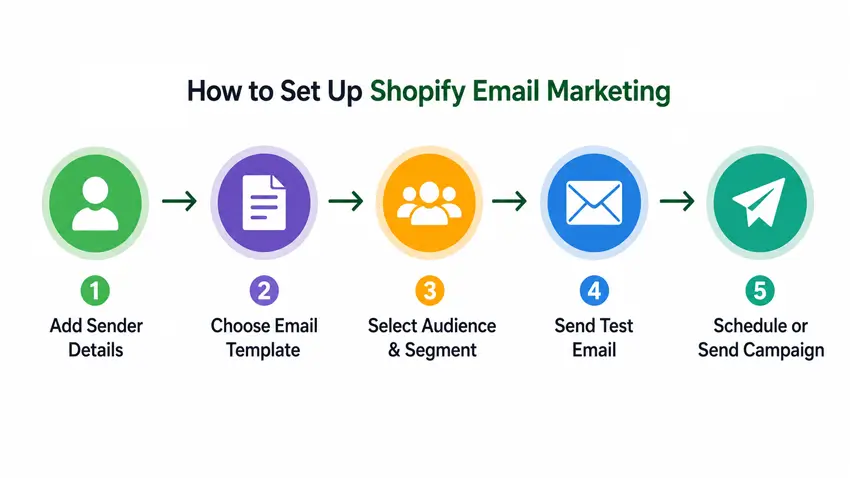
To set up Shopify Email Marketing, log in to your Shopify admin, open the email marketing or messaging tool, add your sender details, choose an email template, select products or collections, choose your customer segment, send a test email, and schedule your campaign. Beginners should start with a welcome email, an abandoned checkout email, and one monthly promotional campaign.

Bring your ideas to life for $1/month
The future of business is yours to shape. Sign up for a free trial and enjoy 3 months of Shopify for $1/month on select plans.
Shopify Email Marketing Setup Checklist
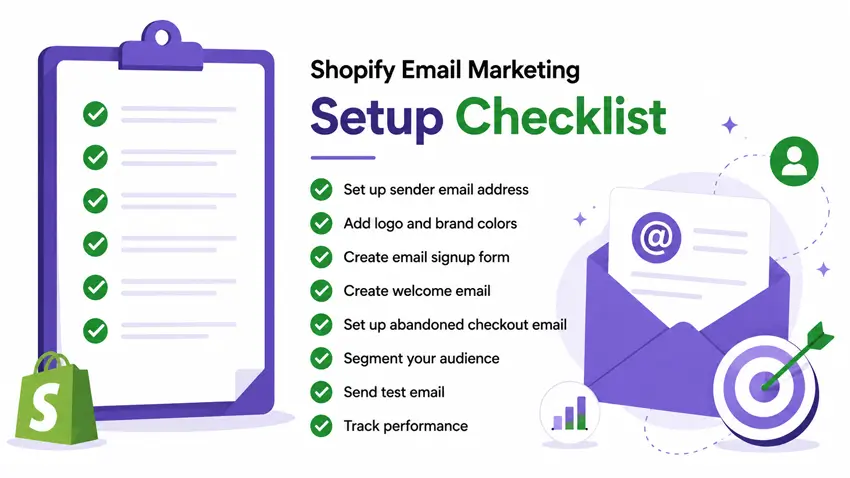
- Set up a professional sender email address.
- Add your store logo and brand colors.
- Create a newsletter signup form.
- Prepare a welcome offer for new subscribers.
- Create a welcome email campaign.
- Set up abandoned checkout recovery emails.
- Add product or collection blocks to your email.
- Segment your audience before sending campaigns.
- Send a test email before publishing.
- Track open rate, click rate, sales, and unsubscribes.
What Is Shopify Email Marketing?
Shopify Email Marketing is the process of sending marketing emails to your Shopify customers and subscribers. These emails can promote products, share discounts, announce new collections, recover abandoned carts, welcome new subscribers, or encourage repeat purchases.
Instead of using a separate platform at the beginning, Shopify beginners can use Shopify’s built-in email tools to create and manage campaigns from the same place where they manage products, orders, and customers.
For example, you can send emails for:
- New product launches
- Seasonal sales
- Discount campaigns
- Abandoned checkout recovery
- Welcome emails
- Post-purchase follow-ups
- Customer win-back campaigns
- New collection announcements
The biggest advantage is simplicity. Shopify already stores your products, collections, customers, and order data. That makes it easier to create targeted email campaigns without moving data between too many tools.
Why Email Marketing Matters for Shopify Stores
Many new store owners focus only on ads or social media. Those channels are useful, but they can become expensive. Email marketing gives you a channel that you own more directly.
When someone joins your email list, you can continue communicating with them without paying for every single click. That makes email useful for long-term customer retention and repeat sales.
Main Benefits of Shopify Email Marketing
- Lower marketing cost: You can reach existing subscribers without relying only on paid ads.
- Better customer retention: Emails help bring past shoppers back to your store.
- Easy product promotion: You can highlight products, collections, discounts, and new arrivals.
- Personalized campaigns: You can send different emails to different customer groups.
- Automation opportunities: You can set up emails that send automatically based on customer behavior.
If your Shopify store already gets traffic but visitors are not buying immediately, email marketing can help you stay connected and bring them back later.
For more growth ideas, you can also read: Ways to Increase Shopify Sales.
Before You Start: What You Need
Before setting up Shopify Email Marketing, prepare a few basic things. This will make your campaigns look professional and help you avoid common beginner mistakes.
1. A Shopify Store With Products Added
Your email campaigns should send people to real products, collections, or landing pages. Before you start, make sure your product pages include clear titles, images, descriptions, prices, and shipping information.
If your store is still under construction, finish the basic setup first. A good-looking storefront helps increase trust when customers click from your email to your website.
2. A Clear Brand Style
Your emails should look similar to your Shopify store. Use the same logo, colors, fonts, and product photography style. This makes your brand feel consistent and more trustworthy.
If you are building a new Shopify store and want a professional design foundation, a premium theme like Mavon Shopify Theme can help you create a clean, conversion-focused storefront. A polished theme also makes your email traffic more valuable because visitors land on a store that feels ready to buy from.
3. Email Subscribers
You need permission before sending marketing emails. Start collecting subscribers through newsletter forms, discount popups, footer forms, checkout opt-ins, or lead magnets.
For beginners, a simple offer works well:
- “Get 10% off your first order”
- “Join our list for new arrivals and exclusive deals”
- “Subscribe for product tips and special offers”
Make sure customers understand what they are signing up for.
4. A Sender Email Address
Use a professional sender email address connected to your domain. For example, instead of using a personal Gmail address, use something like hello@yourstore.com or support@yourstore.com.
Before sending Shopify Messaging campaigns, confirm your sender email address. For best deliverability, use a branded domain email and authenticate the domain with the required DNS records.
This helps your store look more credible and can improve customer trust.
5. A Simple Email Goal
Do not send emails just because you can. Every campaign should have one clear goal. For example:
- Drive sales for a discount campaign
- Promote a new product
- Bring customers back to abandoned carts
- Announce a new collection
- Educate customers about product benefits
One email should usually focus on one main action.
How to Set Up Shopify Email Marketing: Step-by-Step
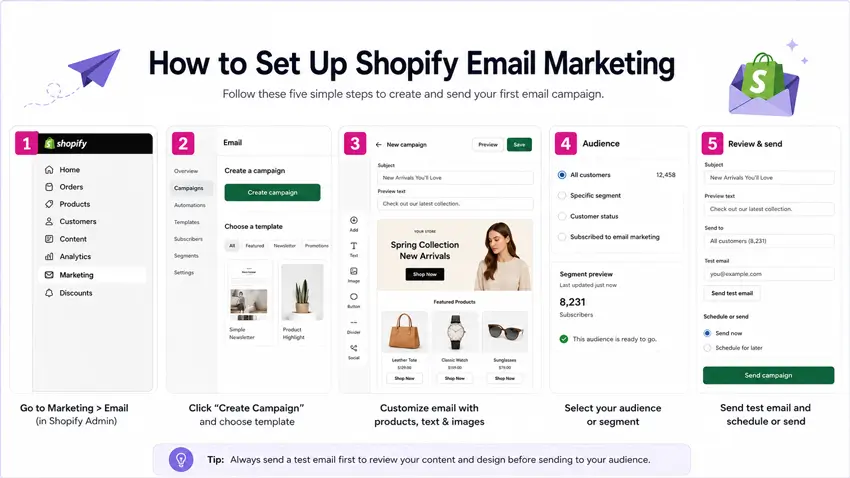
Step 1: Open Shopify Marketing Tools
Log in to your Shopify admin. From there, From your Shopify admin, go to Apps > Messaging. From there, you can create Shopify Messaging email campaigns, customize templates, select customer segments, send test emails, and schedule or send campaigns.
Shopify’s built-in email tools allow you to create emails, customize templates, choose recipients, and schedule campaigns.
If you are new to Shopify, take a few minutes to explore the available templates. You will usually find options for promotions, product highlights, announcements, seasonal campaigns, and automated messages.
Step 2: Set Up Your Brand Details
Before creating your first campaign, add your brand details. This usually includes:
- Store logo
- Brand colors
- Sender name
- Sender email address
- Footer information
- Social links
Your sender name should be easy to recognize. For example, if your store is called “Urban Craft Store,” use that as your sender name instead of a random personal name.
The footer should include important business information and an unsubscribe option. This is important for compliance and customer trust.
Step 3: Choose an Email Template
Shopify provides email templates that you can customize. For your first email, choose a simple template that matches your goal.
Here are beginner-friendly campaign ideas:
- Welcome offer: Send a discount to new subscribers.
- New arrival: Highlight recently added products.
- Best sellers: Promote your most popular products.
- Seasonal sale: Announce a limited-time discount.
- Back-in-stock: Let customers know a product is available again.
Do not overdesign your first email. A clear headline, short message, good product image, and strong call-to-action button are enough.
Step 4: Write a Clear Subject Line
Your subject line decides whether people open your email. Keep it short, specific, and benefit-driven.
Good beginner examples:
- “Your 10% welcome offer is here”
- “New arrivals just landed”
- “Our best sellers are back in stock”
- “Limited-time offer for your next order”
- “Still thinking it over?”
Avoid writing subject lines that sound spammy or exaggerated. Too many capital letters, too many emojis, and unrealistic promises can reduce trust.
Step 5: Add Preview Text
Preview text appears beside or below the subject line in many inboxes. Use it to support the subject line and give people another reason to open.
Example:
- Subject: Your 10% welcome offer is here
- Preview text: Use your discount on our latest collection today.
Keep preview text simple and useful. Do not repeat the subject line word for word.
Step 6: Create the Email Content
Your email content should be easy to scan. Most customers will not read a long email from top to bottom. They will look at the headline, product image, offer, and button.
A good beginner email structure looks like this:
- Short headline
- One or two sentences explaining the offer
- Product or collection image
- Clear call-to-action button
- Optional product benefits
- Footer with store details
Example:
Headline: Welcome to Our Store
Body: Thanks for joining our email list. Enjoy 10% off your first order and discover products designed to make your shopping experience easier.
Button: Shop Now
Keep the design clean. Too many sections can distract people from the main action.
Step 7: Add Products or Collections
One advantage of Shopify Email Marketing is that your products are already inside Shopify. You can add products or collections directly into your email campaign.
For beginners, start with products that already have strong appeal:
- Best-selling products
- High-margin products
- New arrivals
- Products with strong visuals
- Products related to seasonal demand
If your store sells many items, avoid showing too many products in one email. Three to six products are usually enough for a simple campaign.
Step 8: Choose Your Audience Segment
Not every email should go to every customer. Segmentation means sending the right message to the right group of people.
Beginner-friendly segments include:
- All subscribers
- New subscribers
- First-time customers
- Repeat customers
- Customers who have not purchased recently
- Customers interested in a specific product category
For example, a welcome discount should go to new subscribers. A loyalty offer should go to repeat customers. A win-back email should go to people who have not ordered for a while.
If you want to improve your overall store setup, this guide may help: How to Pick the Right Shopify App Stack.
Step 9: Send a Test Email
Before sending your campaign, always send a test email to yourself. Open it on desktop and mobile.
Check these things:
- Does the subject line look good?
- Is the preview text correct?
- Are images loading properly?
- Do all buttons and links work?
- Is the email easy to read on mobile?
- Are prices, discounts, and product details correct?
This step is simple, but it prevents embarrassing mistakes.
Step 10: Schedule or Send Your Campaign
Once everything looks good, you can send the email immediately or schedule it for later. For beginners, scheduling is often better because it gives you more control.
Good sending times depend on your audience, but many stores start with weekday mornings or early afternoons. After you send a few campaigns, check your analytics to see when your audience responds best.
Essential Shopify Email Automations for Beginners
Manual email campaigns are useful, but automations can save time. An automation sends an email when a customer takes a specific action.
Start with these basic automations.
1. Welcome Email
A welcome email is sent after someone subscribes to your email list. This is one of the most important emails because the subscriber has just shown interest in your store.
Your welcome email can include:
- A short thank-you message
- A first-order discount
- Best-selling products
- A quick brand introduction
- A link to shop popular collections
2. Abandoned Checkout Email
An abandoned checkout email is sent when a customer starts checkout but does not complete the purchase. This email reminds them to return and finish the order.
A strong abandoned checkout email should include:
- A friendly reminder
- The product or checkout link
- A clear “Complete Your Order” button
- Optional discount or free shipping message
- Support contact information
You can also improve tracking by setting up analytics and advertising pixels. This guide can help: How to Add Facebook Pixel to Shopify.
3. Post-Purchase Email
A post-purchase email is sent after someone buys from your store. This can improve customer experience and encourage repeat orders.
Use this email to:
- Thank the customer
- Share product care tips
- Recommend related products
- Invite them to follow your social media
- Ask for a review after delivery
4. Win-Back Email
A win-back email targets customers who have not ordered for a long time. The goal is to bring them back with a reminder, offer, or new product update.
Example subject lines:
- “We saved something special for you”
- “It’s been a while — here’s 15% off”
- “New products you might like”
5. Product Education Email
Not every email needs to be a discount. Educational emails help customers understand your products better.
For example, a skincare store can send product routine tips. A clothing store can send styling ideas. An electronics store can send setup guides.
If you sell niche products, helpful content can build trust before asking for a sale.
How Mavon Shopify Theme Helps Email Marketing Campaigns Convert Better
Email marketing does not stop when someone opens your email. The real conversion happens after they click and land on your Shopify store. That is why your theme design, product discovery, trust elements, and shopping experience are important.
The Mavon Shopify Theme can support email marketing campaigns by giving your store conversion-focused sections and features that match common email campaign goals.
| Email Marketing Goal | Mavon Feature That Can Help | Why It Matters |
| Grow your email list | Email Signup section, promo popup, contact form | Helps collect subscribers from store visitors. |
| Promote new products | Featured Product, Featured Collection, Slideshow, Banner List | Lets shoppers quickly discover products after clicking from email. |
| Improve product discovery | Mega menu, enhanced search, product filtering and sorting | Makes it easier for email visitors to find relevant products. |
| Increase urgency | Countdown timer, promo banners, stock counter | Useful for limited-time email offers and seasonal campaigns. |
| Build trust | Testimonials, trust badges, product reviews, FAQ page | Helps reduce hesitation after shoppers land on your store. |
| Improve buying experience | Quick buy, slide-out cart, sticky cart, recommended products | Reduces friction and helps customers move faster from product view to checkout. |
For example, if you send an email about a seasonal sale, you can send visitors to a Mavon-powered landing section with a promo banner, countdown timer, featured collection, quick buy option, and trust badges. This creates a smoother journey from email click to purchase.
You can explore these features on the Mavon theme features demo or view the Mavon Shopify Theme page on Shopibuffet.
Example First Shopify Email Campaign for Beginners
If you are not sure what to send first, start with a simple welcome offer campaign.
- Campaign goal: Convert new subscribers into first-time customers.
- Subject line: Welcome! Here is 10% off your first order
- Preview text: Start shopping our latest collection today.
- Email headline: Thanks for joining our store
- Email body: We are happy to have you here. Use code WELCOME10 at checkout and explore our best-selling products.
- CTA button: Shop Best Sellers
- Landing page: A featured collection or best-seller collection page.
Best Shopify Email Campaigns for Beginners
| Email Type | Purpose | Best Time to Send |
| Welcome Email | Introduce your brand and offer a first-purchase discount | Immediately after signing up |
| Abandoned Checkout Email | Recover shoppers who left checkout | After checkout abandonment |
| Product Launch Email | Promote new arrivals or collections | When new products go live |
| Post-Purchase Email | Thank customers and suggest related products | After purchase |
| Win-Back Email | Bring inactive customers back | After long inactivity |
Best Practices for Shopify Email Marketing
Keep Your Emails Simple
Beginner store owners often try to include too much in one email. Keep each campaign focused on one message and one main action.
Instead of promoting ten different things, promote one collection, one sale, or one product category.
Use Strong Calls to Action
Your call-to-action button should tell customers exactly what to do next.
Good CTA examples:
- Shop New Arrivals
- Get 10% Off
- Complete Your Order
- View Best Sellers
- Explore the Collection
Avoid vague buttons like “Click Here.” Be specific.
Make Emails Mobile-Friendly
Many customers read emails on mobile. Use short paragraphs, clear buttons, and simple layouts. Make sure images are not too small and buttons are easy to tap.
Also, check your Shopify store speed. A slow store can hurt conversions after someone clicks from your email. You may find this useful: Shopify Page Speed Optimization.
Do Not Overuse Discounts
Discounts can increase sales, but using them too often can train customers to wait for offers. Mix discount emails with educational content, product launches, best-seller highlights, and helpful guides.
Track Your Results
After sending emails, review performance. Look at:
- Open rate
- Click rate
- Sales from email
- Unsubscribes
- Top-performing products
If people open but do not click, improve your email content and CTA. If people click but do not buy, improve your product page, pricing, offer, or store experience.
For SEO and long-term traffic improvement, you can also read: Shopify SEO Guide and Shopify SEO Checklist.
Beginner Email Marketing Calendar for Shopify Stores
If you are not sure how often to send emails, start with a simple monthly plan.
Week 1: Welcome or Brand Story Email
Introduce your store, explain what makes your products useful, and invite subscribers to explore your best sellers.
Week 2: Product Highlight Email
Choose one product or collection and explain why customers should care. Include benefits, images, and a clear CTA.
Week 3: Educational Email
Share a useful tip, guide, or product-related advice. This builds trust without always pushing a sale.
Week 4: Offer or Promotion Email
Send a limited-time discount, bundle offer, free shipping offer, or seasonal campaign.
This schedule keeps your list active without overwhelming subscribers.
Common Shopify Email Marketing Mistakes to Avoid
Sending Emails Without Permission
Only send marketing emails to people who agreed to receive them. This protects your brand and improves engagement.
Using Weak Subject Lines
If your subject line is boring or unclear, fewer people will open your email. Make it specific and relevant.
Adding Too Many Products
Too many choices can reduce clicks. Keep your campaign focused.
Ignoring Mobile Preview
An email that looks good on desktop may look crowded on mobile. Always test both.
Not Improving the Store Experience
Email traffic is valuable. Make sure your landing pages, product pages, checkout experience, and store speed are ready before sending big campaigns.
If you want to understand broader Shopify growth potential, read: Shopify Success Rate.
🚀 Ready to skyrocket your Shopify store to success?
🚀 Unlock the secrets to success and boost your sales 📈 with ShopiBuffet’s expert services. Don’t miss out, get started now!
Frequently Asked Questions
1. Is Shopify Email Marketing good for beginners?
Yes. Shopify Email Marketing is beginner-friendly because you can create campaigns from your Shopify admin, use templates, add products from your store, and send emails to customer segments without setting up a complex external tool at the beginning.
2. What should be my first Shopify email campaign?
A welcome email is a good first campaign. You can thank new subscribers, introduce your store, share your best products, and offer a small first-order discount.
3. How often should a Shopify store send marketing emails?
Beginners can start with one email per week or two to four emails per month. Focus on quality first. Send useful product updates, offers, educational content, and seasonal campaigns instead of emailing too often.
4. Can Shopify send abandoned checkout emails?
Yes. Shopify supports abandoned checkout emails through its email automation features. These emails remind customers to return and complete their purchase after they leave checkout.
5. How can I improve sales from Shopify email campaigns?
Use clear subject lines, strong product images, simple layouts, focused offers, mobile-friendly design, and direct call-to-action buttons. Also, make sure your Shopify store design, product pages, and checkout flow are optimized before sending traffic from email campaigns.
Final Thoughts
Shopify Email Marketing is a smart starting point for beginners who want to grow their store without depending only on ads. You can create campaigns, promote products, welcome subscribers, recover abandoned checkouts, and encourage repeat purchases directly from your Shopify admin.
Start simple. Build your list, send useful emails, test your subject lines, and track results. Over time, you can improve your campaigns with better segmentation, stronger offers, and more personalized automations.
Also, remember that email marketing works best when your Shopify store is ready to convert visitors. A professional theme like Mavon Shopify Theme can help you create a better shopping experience for the customers who click on your emails.
If you are building or improving your Shopify store, explore more Shopify tips, themes, and growth resources from Shopibuffet.