


AI search is changing how customers discover products and brands. To stay visible, you must optimize your Shopify store for AI search, not just traditional SEO.
In this guide, you will learn a practical Shopify GEO process you can actually follow. We will keep sentences short, the structure clean, and every section focused on actions you can implement.
Quick-answer:
To optimize your Shopify store for AI search, you must combine solid SEO with GEO principles. Focus on clear entities, structured data, conversational FAQs, and strong product content so AI engines can understand, trust, and recommend your store in 2026.
Table of Contents
TL;DR: Quick GEO checklist for Shopify
If you only have five minutes, start here. This checklist gives you a fast roadmap to optimize your Shopify store for AI search.
– Clean and enrich product titles and descriptions so they are clear and detailed.
– Implement key schema types like Product, Review, FAQPage, Organization, and Article.
– Fix navigation and internal linking so your structure is simple and logical.
– Add conversational FAQs to important pages, then mark them up with FAQ schema.
– Improve speed and UX so pages load fast and feel smooth on mobile.
– Build topic clusters around your niche with answer-focused content.
Once these are in place, you will have a strong Shopify GEO foundation. After that, you can refine and expand based on data and results.
What is AI Search and Shopify GEO?
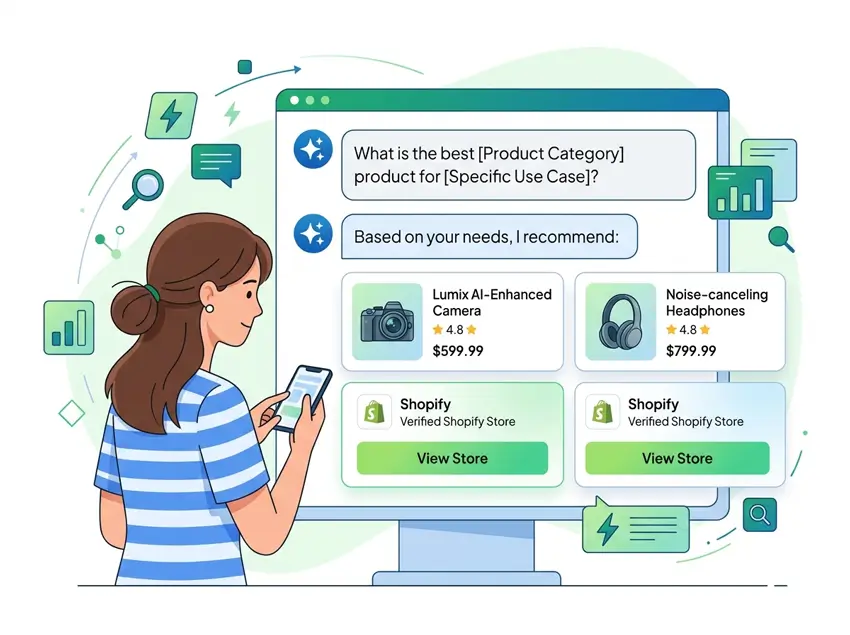
AI search means users get direct answers from AI systems instead of long lists of links. These systems might be search features like AI Overviews or chat tools like ChatGPT and other AI assistants.
Shopify GEO, or Generative Engine Optimization for Shopify, is the practice of making your store easy for these systems to read and reuse. The goal is simple. When someone asks an AI for advice or product ideas, your store should appear as a trusted answer source.
Traditional SEO focuses on rankings, snippets, and clicks. Shopify GEO focuses on being understandable, reliable, and safe for AI to recommend. You still need SEO basics, but now you design content and structure for humans and AI at the same time.
Why Optimizing Your Shopify Store for AI Search Matters in 2026
More users now rely on AI tools to research products, compare options, and plan purchases. These experiences often show answers, summaries, and product suggestions before any normal result.
If your brand is missing from those AI answers, you lose awareness, traffic, and sales opportunities. If your data is unclear or inconsistent, AI systems may decide that recommending you is too risky.
By optimizing your Shopify store for AI search, you can appear when users ask broad and complex questions. You can also strengthen trust by showing accurate details, real reviews, and clear policies. This helps your store perform better in regular search and AI experiences at the same time.
How AI Engines “See” Your Shopify Store?
AI systems do not browse your store like a person with a mouse. They crawl HTML, schema, feeds, and links, then convert that information into structured knowledge.
Several elements matter a lot here. First, your product data needs to be clean and complete. Titles, descriptions, attributes, prices, and availability should match across the page and schema. Second, your structured data must be correct and easy to parse. Third, your navigation and internal links should reveal how different pages relate to each other.
Trust signals also play a big role. Clear contact details, transparent policies, and visible reviews all help. When these pieces are aligned, AI engines can understand what you sell, who you are, and which questions your content can answer.

Bring your ideas to life for $1/month
The future of business is yours to shape. Sign up for a free trial and enjoy 3 months of Shopify for $1/month on select plans.
How to Optimize Your Shopify Store for AI Search
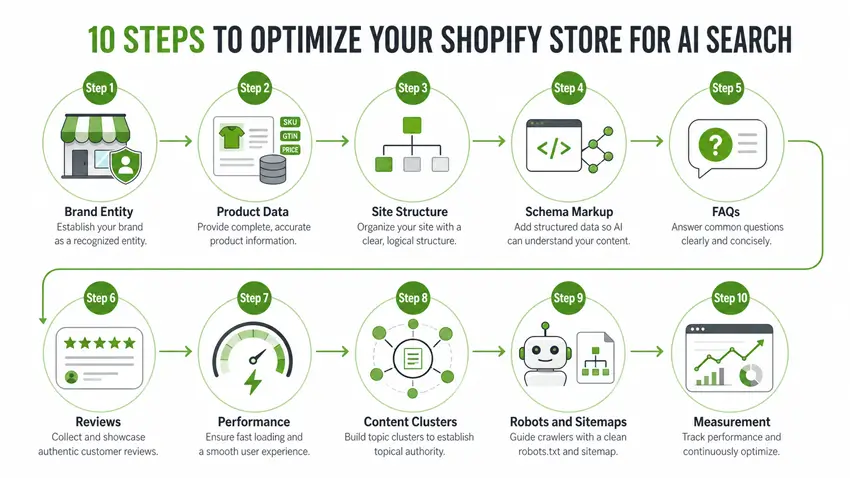
Step 1: Clarify Your Entities and Niche Focus
Entity clarity is one of the most important concepts in Shopify GEO. In simple language, an entity is a “thing” that AI needs to recognize and describe correctly.
Start with your brand. Define clearly what your store sells, which audience you serve, and which problems you solve. Use these ideas in your homepage hero, About page, and main collections. Repeat them naturally in headings, first paragraphs, and image alt text.
Then clarify your core product categories. Avoid vague labels like “Products” or “Stuff.” Use category names that match how real buyers search and speak. Over time, this consistent language helps AI link your brand to specific needs and solutions.
Step 2: Fix Product Data for AI Readability
Product pages are the core of your Shopify GEO work. AI systems depend on your product data to compare options and create recommendations.
Review your top products first. Rewrite titles so they are descriptive, specific, and easy to say out loud. Avoid keyword stuffing or generic names with no context. Then refine descriptions so they explain what the product is, who it is for, and why it is useful.
Include specific attributes like materials, size, color, compatibility, and care instructions. Make sure prices and availability are accurate and visible. If variant options exist, label them clearly so buyers and AI systems understand the differences.
A simple workflow can help. Pick the top ten products, rewrite the titles in plain language, add a short benefit section, and follow with bullet features. Close the page with a small FAQ block that handles the most common questions or objections. This structure helps both shoppers and AI engines digest your content.
Step 3: Improve Site Structure and Internal Linking
Your site structure tells both search engines and AI systems how your content fits together. A messy structure makes crawling harder and weakens your topical authority.
Keep your main navigation simple and focused. Highlight your key collections, best sellers, and important information pages. Avoid deep hierarchies where products hide behind several submenus. Each important page should be reachable in a few clicks.
Internal linking is just as important. Link from blog posts to relevant collections and products. Link between related collections where it makes sense. Add “related products” or “you may also like” sections on product pages. These links help search crawlers and AI engines understand which pages support each other and which topics you cover in depth.
Step 4: Implement the Core Schema for Shopify GEO
Structured data is a major lever when you optimize your Shopify store for AI search. Schema markup turns your content into machine-readable objects with defined fields.
Start with the Product schema on your main products. Include name, description, price, currency, brand, SKU, and availability. Add Review or AggregateRating schema where you have reviews. Use the FAQ Page schema for pages with question and answer blocks.
You should also implement the organization schema so AI systems know who runs the store. Add your brand name, logo, website URL, and social profiles. BreadcrumbList schema helps clarify your category structure. Article schema works well for blog posts, especially if you include a clear author and date.
Many Shopify themes add basic schema, but it is often incomplete. A dedicated JSON‑LD schema app or a custom code snippet can give you more control. After implementation, test and fix errors with a structured data testing tool.
Step 5: Add Conversational FAQs for AI‑friendly Answers
AI answers often lift small chunks of text that look like neat answers. Well-written FAQs create perfect chunks for this purpose.
Add FAQ sections to your product pages that address sizing, use, compatibility, shipping, and returns. On collection pages, answer category-level questions and comparisons. In blog posts, add FAQs that expand on the topic without repeating the main content.
Write questions in natural language, as if a buyer is speaking to an assistant. Keep answers short, direct, and packed with useful details. Two to four sentences per answer usually works well. Where possible, add FAQPage schema so search engines and AI tools can identify these blocks quickly.
If managing FAQs across many pages feels hard, consider a dedicated FAQ or help center app. This keeps content structured, consistent, and easier to update as your policies or product line change.
Step 6: Strengthen Reviews and Social Proof
AI systems care about trust as much as relevance. Strong reviews and social proof help both buyers and algorithms feel more confident about your store.
Make it easy for customers to leave reviews, and encourage them to mention real use cases. Highlight rating averages and review counts on product pages. If possible, sync or display third‑party reviews, such as Google or marketplace feedback, alongside onsite reviews.
Where supported, ensure your review app exposes structured rating data. Combined with the product schema, this creates a clear machine-readable signal that your store has social proof. Also, keep policies and contact details visible. Clear returns and support options increase trust and reduce perceived risk.
Step 7: Keep Performance and UX GEO‑friendly
Slow stores and clunky interfaces hurt rankings, conversions, and crawlability. They also degrade the experience when AI-driven traffic lands on your store.
Focus on the basics first. Compress images, remove unused apps, and limit heavy scripts where possible. Choose a Shopify theme known for clean code and good performance. Test core pages on mobile devices, not only on desktop screens.
Good UX also means clear typography, readable font sizes, and buttons that are easy to tap. Make important actions obvious, like Add to Cart and key filters. These improvements help all users, and they also support engagement signals that search engines monitor.
Step 8: Build GEO‑friendly Content Around Your Niche
You still need content to build authority in the AI era. The difference is that your content must be more structured, answer-focused, and easy to extract.
Plan topic clusters instead of isolated posts. Start with one comprehensive pillar article on a core problem your audience faces. Then create supporting posts that handle narrower questions, comparisons, or step‑by‑step tutorials. Link them back to the pillar and to relevant products and collections.
Use headings that echo real questions. Open each article with a short, direct answer paragraph. Keep sentences under eighteen words and paragraphs short. Add examples, scenarios, and mini workflows, especially for eCommerce and dropshipping cases. This style helps AI engines lift accurate, self‑contained chunks from your content.
Step 9: Check robots.txt and Sitemaps for AI Discovery
Your technical settings can quietly block your geo efforts if they are misconfigured. That is why you should review robots.txt and sitemaps as part of this process.
Make sure you are not accidentally blocking important crawlers that power search and AI tools. Check that your XML sitemap includes key products, collections, blogs, and landing pages. Fix or remove duplicate, thin, or obsolete URLs whenever possible.
If you use any index control or sitemap manager apps, review their rules carefully. Keep important content indexable, and only exclude pages that truly offer no value, like test pages or system URLs. Healthy crawl and index settings help your other GEO tasks show up in practice.
Step 10: Measure Impact and Keep Iterating
Results from GEO and AI search optimization rarely appear overnight. However, you can track progress with a simple measurement plan.
Monitor organic traffic and revenue for the categories and products you focused on. Compare performance before and after you improved product data, schema, and FAQs. Pay attention to long‑tail queries and question-style keywords in your analytics and search reports.
Over ninety days, you can follow a simple cycle. In the first month, clean and upgrade product data for priority items. In the second month, implement schema and FAQs across key pages. In the third month, improve performance, refine content clusters, and expand internal linking. Then repeat this cycle for new areas of the store.
Example GEO Workflow for a Dropshipping Shopify Store
Let’s walk through a concrete example. Imagine you run a dropshipping store that sells ergonomic home office accessories.
You could begin by defining your niche and main promise in one clear statement. For example, you help remote workers build pain-free desk setups with ergonomic chairs, footrests, and laptop stands. You would use that statement on the homepage and main collections.
Next, you would pick your ten best products and clean them up fully. Titles would mention use cases, such as “ergonomic footrest for long work days.” Descriptions would explain who benefits, which problems it solves, and how to use it. Each product would receive a small FAQ and a proper Product schema.
Then you would publish a pillar guide on setting up a comfortable home office. Inside that article, you would reference your products naturally and link to them.
Over time, you would add supporting posts around posture tips, remote work routines, and gear comparisons. This cluster would signal strong topical authority to both search engines and AI tools.
Learn More: What Is Dropshipping and How Does It Work?
🚀 Ready to skyrocket your Shopify store to success?
🚀 Unlock the secrets to success and boost your sales 📈 with ShopiBuffet’s expert services. Don’t miss out, get started now!
Frequently Asked Questions
What does it mean to optimize your Shopify store for AI search?
It means designing your store so AI systems can easily read, understand, and recommend your products. You blend traditional SEO with GEO techniques that focus on entities, schema, FAQs, and trust.
What is Shopify GEO in simple language?
Shopify GEO is Generative Engine Optimization for your Shopify store. You structure content, data, and tech so generative AI tools feel safe using your store as a reference.
Do I still need normal SEO if I focus on GEO?
Yes, you still need normal SEO. Most GEO tactics depend on solid SEO basics like good content, logical structure, and strong technical health.
Which schema should I implement first for Shopify GEO?
Start with Product, Review, or AggregateRating, FAQPage, and Organization schema. These schemas give AI engines clear, structured information about your products, brand, and key answers.
How long does it take to see results from Shopify GEO?
You may notice early signs in a few weeks if your store has traffic. Full impact often takes several months as crawlers reprocess your pages and AI systems update their internal knowledge.
Conclusion: Focus on clarity, structure, and real value
Optimizing your Shopify store for AI search is not about tricks or hacks. It is about making your store easier to understand, trust, and reuse for both people and machines.
If you focus on clear entity definitions, high-quality product data, strong schema, helpful FAQs, visible reviews, and fast UX, you will already outpace many competitors. Then keep building GEO‑friendly content around your niche, with short sentences and structured answers.
Treat Shopify GEO as a long-term habit, not a one-time project. Small, consistent improvements can compound into better visibility in Google, AI Overviews, and the next generation of AI shopping experiences.