

Online payment conversion is defined by friction. For e-commerce merchants, every required form field drops conversion metrics, while buyers face escalating security threats from data breaches and credential credential scraping.
Shop Pay is Shopify’s native accelerated checkout solution designed to bridge this gap. This technical audit explores exactly how Shop Pay functions under the hood, evaluates its underlying cryptographic infrastructure, addresses operational risks, and contrasts it directly against competing frameworks.
What is Shop Pay?

Shop Pay is a network-wide tokenized checkout solution developed by Shopify. It securely encrypts and saves customer email addresses, credit card data, billing locations, and shipping addresses across millions of independent digital storefronts.
The Network Advantage: Shop Pay has more than 150 million global profiles natively saved in its system. This creates an interconnected network effect: when a customer signs up on any Shopify store, their information is instantly available to autofill on your store the second they arrive.
How Does Shop Pay Work?
The platform switches traditional multi-page checkout forms out for an automated, secure handshake.
1.Initial Profile Tokenization:
During a customer’s first purchase at an authorized storefront, they input their full data arrays and toggle the “Save my information” setting. The system binds their encrypted payment profile to their verified mobile phone number.
2.Cross-Network Fingerprinting
When that same customer arrives at any storefront running the framework, the Shopify infrastructure recognizes their active device cookie or email string and instantly surfaces the purple express checkout terminal.
3.Two-Factor Cryptographic Validation:
The customer triggers a 6-digit SMS verification code or matches device-level biometrics. Actual raw credit card strings are never transmitted to the individual merchant; instead, a single-use authorization token completes the transaction safely.
4.Liquidity Settlement
Shopify Payments settles the balance directly into the merchant’s linked bank file. If a Buy Now, Pay Later (BNPL) installment structure is selected, the underwriting bank (Affirm) advances the complete order total upfront, minus processing fees.
Comprehensive Gateway Matrix: Shop Pay vs. Competitors
Merchants face clear operational trade-offs across distinct acceleration payment pathways. Use the comparison framework below to optimize your checkout layout:
| Feature Framework | Shop Pay / Installments | PayPal Express | Apple Pay | Google Pay |
| Core Conversion Moat | Pre-saved profiles across 150M+ users globally. | Deep brand familiarity; alternative balance spending. | Device-level biometric instant-checkout logic. | Broad browser profile synchronization. |
| User Onboarding Friction | Low (SMS or biometric confirmation). | Moderate (Requires off-site app/browser login). | Low (Instant face/fingerprint scan). | Low (Autofills native Chrome data profiles). |
| Native BNPL Capabilities | Built-in via Affirm underwriting. | Built-in via PayPal Pay in 4. | None native (Requires external payment apps). | Limited (Depends on regional account access). |
| Processing Fee Layout | Standard Shopify plan card rates. | 2.9% to 4.4% + flat fee regional base rates. | Matches standard credit gateway charges. | Matches standard credit gateway charges. |
| Checkout Placement | Integrated seamlessly in the native checkout flow. | Standalone block buttons required. | Standalone block buttons required. | Standalone block buttons required. |
Is Shop Pay Safe? Cryptographic and Structural Trust
From a security architecture perspective, Shop Pay ranks among the safest available e-commerce networks. Shopify’s infrastructure operates on a multi-tier defense model:
- PCI DSS Level 1 Compliance: The platform is fully certified under the highest tier of the Payment Card Industry Data Security Standard. Saved payment information is entirely isolated on encrypted servers.
- Tokenization Protocol: Credit card strings are converted into randomized alphanumeric strings (tokens). Merchants never see, store, or handle sensitive financial numbers, completely eliminating your store’s exposure to data-theft liability.
- Two-Factor Authentication (2FA): Every transaction attempted from an unverified device demands a mandatory 6-digit SMS verification code, stopping automated credential-stuffing attacks in their tracks.
Recommended Blogs for You:
👉 Best Shopify Theme for SEO in 2024
👉 How to Add PayPal to Shopify: Simplify Your Payment Processes
👉 How to Add More Payment Methods Shopify: Expand Your Payment Options
👉 How to Start an Antique Business Online: A Beginners Guide
👉 How To Find a Product to Sell Online With 10 Strategies
The Real-World Audit: Strategic Pros & Cons
An objective evaluation shows that while Shop Pay offers major conversion boosts, it does present real operational considerations that store managers must keep in mind.
The Clear Operational Advantages
- Conversion Optimization Metrics: Internal merchant tests indicate that Shop Pay checkouts can outpace guest paths by up to 4x. This streamlined process drives a conversion increase of roughly 50% for returning buyers.
- Mobile Cart Abandonment Mitigation: Mobile conversion rates scale roughly 1.91x higher when utilizing the tokenized single-tap interface compared to standard desktop checkout lines.
- Immediate Installment Funding: For high-ticket items, Shop Pay Installments can boost Average Order Value (AOV). Merchants receive full payment immediately upon shipment, meaning Affirm carries all collection and default risks.
The Strategic Friction Points (Drawbacks)
- Ecosystem Brand Dilution: The express checkout terminal features prominent “Shop App” styling. This can pull customer focus toward Shopify’s consumer ecosystem rather than reinforcing your custom brand identity.
- Affirm Compliance Underwriting Vulnerability: Shop Pay Installments are governed by strict lending terms. If your product catalog spans high-risk categories (such as specialty wellness items, regulated goods, or specific luxury tiers), automated reviews can suddenly pause your checkout features without warning.
- Cross-Border Multi-Currency Friction: If your shop runs multi-currency setups alongside complex international localized pricing layers, unexpected gateway conversions can cause minor settlement variations on foreign cards.
How to Activate Shop Pay
Setting up the feature requires a live Shopify Payments gateway account.
Step 1: Access Payment Gateways
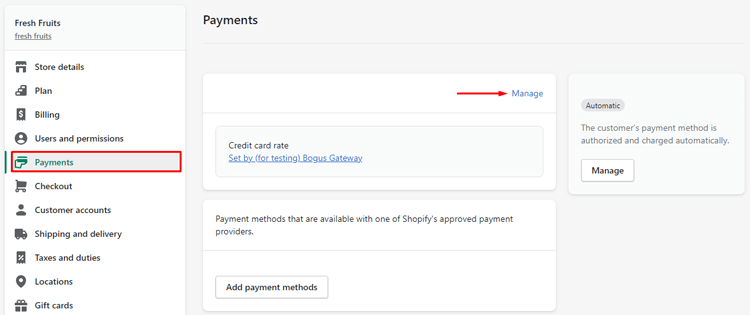
Navigate to your Shopify Admin Panel. Select Settings in the bottom left console, then select Payments.
Step 2: Manage Shopify Payments
Locate the active Shopify Payments block and select the Manage link.
Step 3: Toggle Accelerated Checkout Elements
Scroll to the Accelerated Checkouts configuration line. Ensure the Shop Pay checkbox is marked active.

Step 4: Configure Installment Support
If your store is based in the United States and processes transactions in USD, check the Shop Pay Installments option below the core settings block to instantly turn on flexible financing. Select Save.
Shop Pay Installments: The Financial Framework
For stores running high-ticket niches, offering flexible payment methods lowers the barrier to purchase. The operational mechanics break down by order volume thresholds:
| Order Value Threshold (USD) | Repayment Cadence | Interest Conditions | Credit Impact Profile |
| $50.00 to $999.99 | 4 equal bi-weekly payments. | 0% APR; zero hidden late fees. | No soft or hard credit check impact. |
| $150.00 to $20,000.00 | Monthly options (3, 6, or 12 months). | 10% to 36% APR based on eligibility. | Soft check for access; failures can impact buyer histories. |
Technical Troubleshooting: Merchant Solutions
- Payment Method Sync Failures: If a returning customer experiences constant card rejection errors, it is usually tied to a zip code mismatch between their cached Shop Pay billing profile and their credit card company’s records. Direct the buyer to update their records at
shop.app/pay. - Missing Installment Banners on Product Pages: This typically happens when you use custom, non-standard liquid code blocks on your store’s theme. Make sure to embed the required theme section hooks inside your main
product.jsonfile to let Affirm’s script calculate dynamic pricing updates correctly. - Unexpected Cart Abandonment Spikes: If abandonment numbers rise after turning on the feature, verify that your checkout layout doesn’t hide alternative options. Ensure guest checkout buttons and alternative gateways remain clearly visible to accommodate users who prefer not to save their personal information.
Frequently Asked Questions
Is Shop Pay limited exclusively to Shopify storefronts?
Yes. Shop Pay requires the core Shopify checkout engine to process transactions. However, if a merchant runs a headless architecture via Shopify’s Storefront API, they can still integrate Shop Pay buttons across custom external apps and sites.
Can customers use Shop Pay on non-Shopify websites or platforms?
No. The payment infrastructure depends on Shopify’s secure servers and token networks. It cannot be used as a standalone gateway on alternative platforms like custom WooCommerce or Magento setups.
Are merchants charged extra processing fees for standard Shop Pay checkouts?
No. Standard one-tap transactions are processed at your base Shopify Payments credit card rate. No extra premium or processing surcharges apply unless the customer chooses a Shop Pay Installments financing path (which carries a standard 5% to 6% transaction fee).
Maximizing Your Checkout Strategy
To get the most out of Shop Pay while building trust with your audience, frame the feature as an optional tool for speed rather than a mandatory check-in step. Keep standard guest checkout options clearly visible to give buyers full control over their data privacy.
By tracking your checkout analytics weekly, you can watch for conversion boosts and spot any technical theme glitches early—ensuring your store’s path from cart to purchase stays as smooth as possible.