


Quick answer: You can use ChatGPT for Shopify store management in five ways: (1) write product descriptions, (2) draft SEO titles and meta descriptions, (3) reply to customers, (4) plan email campaigns, and (5) analyze exported store data. ChatGPT works outside your Shopify admin, so you copy its drafts in and check every fact before publishing. For tasks that need live store data or admin actions, use Shopify Sidekick instead.
Running a store means writing, replying, planning, and checking numbers every single day. ChatGPT for Shopify can take the first draft of much of that work off your plate. You still review and publish everything yourself.
So how do you use it well? Give it real product facts, ask for a clear format, and check the result. That is the whole method. The five ways below show you how, with prompts you can copy.
You are not early to this. Pew Research Center reported in June 2025 that 28% of employed US adults used ChatGPT for work, up from 8% in 2023. Shopify’s own 2025 Business Strategy and Planning Survey also found that three in four business owners use AI tools in some way.
Table of Contents
What Does ChatGPT for Shopify Actually Mean?
People use the phrase in three different ways:
- As an assistant. You open ChatGPT in a separate tab. It drafts copy, plans, and summaries. This guide covers this use.
- As an app on your storefront. Some Shopify apps use AI models to answer shoppers. That is a different tool with its own setup.
- As a sales channel. Shoppers find your products inside ChatGPT. Shopify’s Help Center says ChatGPT is a discovery channel, and customers finish the purchase in your store’s checkout.
Read our guide to Shopify agentic storefronts and how to optimize your Shopify store for AI search if that is your goal.
How ChatGPT Fits Into Your Shopify Workflow
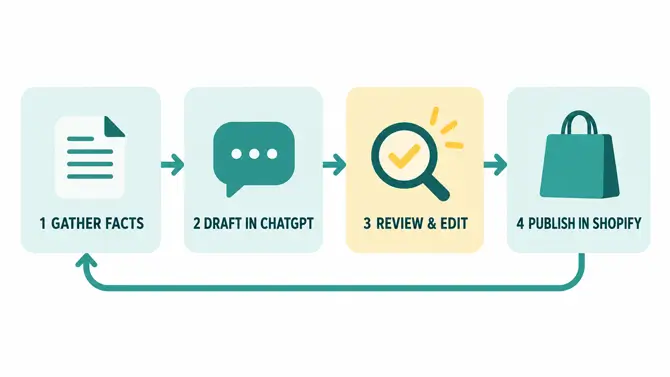
ChatGPT for Shopify work sits before the publish button, not inside your admin. Every task follows the same four steps:
- Gather facts. Collect real product details, policies, or exported data.
- Draft in ChatGPT. Paste the facts into a clear prompt and ask for a set format.
- Review and edit. Check facts, fix the tone, and remove anything you cannot prove.
- Publish in Shopify. Add the final text in your admin, or hand admin tasks to Sidekick.
Here is where each part of your store fits:
| Shopify area | What ChatGPT can draft | What you do in Shopify |
|---|---|---|
| Products | Titles, descriptions, benefit bullets | Check facts, paste, publish |
| Collections | Collection intros, page titles, meta descriptions | Add them on the collection page |
| Variants | Clean option names, variant-specific alt text | Update the product’s variant fields |
| Customer segments | Segment ideas and matching email angles | Build the segment in admin, or ask Sidekick |
| Exported data | Patterns from a cleaned CSV file | Re-check numbers in a spreadsheet |
Way 1: Write Product Titles and Descriptions
This is the easiest place to start with ChatGPT for Shopify. Writing copy for a whole catalog is slow, and Shopify’s 2025 survey found content generation is the most common AI use case among business owners.
The risk is invented facts. ChatGPT will happily add “waterproof” to a bag that is not waterproof. So you must give it the facts and forbid extras.
Try this prompt:
Act as an ecommerce copywriter. Write a product description for [product name].
Facts: [materials, size, colour, care, price range]
Audience: [who buys this]
Tone: [friendly / premium / plain]
Format: a 2-sentence hook, 4 bullet benefits, one closing line. Max 120 words.
Use only the facts above. Do not invent features or claims.
Check before you publish:
- Compare every claim with your supplier sheet.
- Remove hype words like “best” or “perfect” unless you can prove them.
- Rewrite the hook so products don’t all sound the same.
Bonus: clean up your variants
Variants (size, color, material) often get messy names like “S”, “Small”, and “sm” in one catalog. ChatGPT can standardize them fast.
Here are my product options: [paste the option names and values].
Rewrite them into one consistent format. Size: S, M, L, XL. Color: use simple names.
Then write one short alt text line for each color variant of [product name].
Do not add any option I did not list.
Re-check the result against your real stock before you change anything in your admin.
For a deeper method, see our guide on how to write Shopify product descriptions that sell.
Way 2: Draft SEO Titles, Meta Descriptions, and Alt Text
ChatGPT is good at writing many short variations fast. That fits SEO fields well.
Use it for:
- Page titles (keep them near 60 characters)
- Meta descriptions (keep them near 155 characters)
- Image alt text
- Collection page intros
ChatGPT does not know your search data. Bring your own keywords from Google Search Console and paste them into the prompt.
Write 3 page title options and 3 meta description options for this collection page.
Main keyword: [keyword]
What the page offers: [one sentence]
Limits: titles under 60 characters, descriptions under 155 characters.
Tone: clear, no hype. Do not use the word "best".
Pick the strongest option and add it on the collection page. Our guide on how to add meta tags to Shopify shows where each field goes.
Way 3: Speed Up Customer Support
Customer support is an under-used area. Shopify’s Business Strategy and Planning Survey (Q4 2025) found fewer than a third of AI-using business owners apply AI to customer service.
Here is where ChatGPT for Shopify support work helps a small team:
- Reply drafts. Paste a customer message with the name, email, and address removed. Ask for a polite, short reply.
- Policy first drafts. Ask for a shipping or returns policy outline. Then edit it to match what you really do.
- FAQ answers. Give it your ten most common questions and ask for two-sentence answers.
Never publish a policy without checking it against your real process. If the policy has legal weight, get professional advice.
Once your answers are ready, publish them on a page or through an FAQ app. HelpMate ‑ FAQ & Help Center is one free option that adds a floating help button to your storefront, according to its Shopify App Store listing.
See also how to improve customer service and how to add a FAQ page on Shopify.
Way 4: Plan Email and Marketing Campaigns
ChatGPT cannot send email. Using ChatGPT for Shopify email work means planning and drafting, which is often the slow part.
Ask it to:
- Outline a welcome series, an abandoned cart flow, or a post-purchase flow
- Write five subject line options for one email
- Rewrite a long email into three short sentences
- Suggest a simple calendar for a sale week
Try this prompt:
I run a Shopify store that sells [product type] to [audience].
Draft a 3-email welcome series. For each email give: goal, subject line, preview text, and a 100-word body.
Tone: warm and direct. No fake urgency.
Bonus: find customer segments worth building
Customer segments are groups of shoppers you filter in your Shopify admin. ChatGPT cannot build them for you. It can help you decide which groups deserve an email.
My store sells [product type]. Suggest 5 customer segments based on order history,
for example first-time buyers or people who have not ordered in 90 days.
For each one, give a goal and one email idea. I will build the segments in Shopify myself.
Shopify’s guide says Sidekick can create customer segments, so you can hand the build step to it.
Then build and send the flow inside your email tool.
Our guide to setting up Shopify email marketing covers that part.
Way 5: Analyze Your Exported Store Data
Shopify lets you export data such as orders and products as CSV files. This is a smart use of ChatGPT for Shopify data: you ask it to find patterns.
Good questions to ask:
- Which products have many views but few orders?
- Which products often sell together?
- What are the most common reasons in my refund notes?
Privacy first. Delete customer names, emails, phone numbers, and addresses from the file before you upload it. OpenAI may use conversations from free, Plus, and Pro accounts to train its models unless you opt out in Settings > Data Controls, according to Shopify’s 2026 guide citing OpenAI’s policy.
Then verify. ChatGPT can make math mistakes. Re-check any number in a spreadsheet before you act on it.
Example: Launching 10 New Products in One Week
This is an illustrative scenario, not a case study.
Say you are adding ten products this week. Here is how the five ways combine:
- Facts first. Put materials, sizes, colors, and prices in one sheet.
- Copy and variants. Run the Way 1 prompt for each product, then clean the option names.
- Collection page. Draft the title and meta description with the Way 2 prompt.
- Support and email. Draft FAQ answers from your return rules, then a short launch email.
You supply the facts. ChatGPT drafts. You edit and publish.
What ChatGPT Should Not Do for Your Store
ChatGPT is a drafting tool, not a store manager. Safe use of ChatGPT for Shopify means keeping these limits in mind:
- It can be wrong. Shopify’s guide notes that ChatGPT can produce believable but incorrect answers. OpenAI’s own interface warns that it can make mistakes.
- It can be out of date. Without web search, it may miss new products, fees, or policies. Check Shopify’s official pages for platform rules.
- It sees only what you paste. By default, it cannot see your orders or customers.
- It puts privacy on you. Never paste customer personal data into it.
- It needs your voice. Unedited AI copy reads generic. Add your brand’s tone and real details.
When Should You Use Sidekick Instead of ChatGPT for Shopify?
Shopify Sidekick is Shopify’s built-in AI assistant. According to Shopify’s July 2026 guide, it works inside your admin with access to your store data. It is included with every Shopify plan.
Shopify’s guide says it can help with tasks such as editing themes, building automations, generating reports, and creating customer segments. Here is a simple way to choose:
| Task | Better fit |
|---|---|
| Draft a blog post or email | ChatGPT |
| Research a product idea or write a plan | ChatGPT |
| Create a report from live store data | Sidekick |
| Change a setting or theme in your admin | Sidekick |
| Create a customer segment | Sidekick |
The two tools also work well together. Draft in ChatGPT, then use Sidekick for the admin work.
One caution: Shopify also lists an app inside ChatGPT that describes connecting a store to review orders, manage inventory, and create discount codes. Test any connection on a low-risk setup and check its permissions before linking a live store.
Conclusion
The best way to use ChatGPT for Shopify is simple. Feed it real facts, ask for a clear format, and edit what it gives you. Start with product descriptions or support replies, since the payoff is quick and the risk is low.
Keep the limits in mind. Check facts, protect customer data, and use Sidekick when a task needs live store access.
Read next: To decide which tools deserve a place in your store, see how to pick the right Shopify app stack.
Frequently Asked Questions
Can ChatGPT manage my Shopify store directly?
Not by default. ChatGPT works outside your admin, so you copy its drafts into Shopify yourself.
Is ChatGPT free to use for Shopify tasks?
ChatGPT has a free plan with usage limits. Paid plans add higher limits and newer features, so check OpenAI’s pricing page for current prices.
Does Shopify have its own AI assistant?
Yes. Shopify Sidekick works inside the Shopify admin and is included with every Shopify plan.
Can I sell my Shopify products inside ChatGPT?
Shopify’s Help Center says ChatGPT is a discovery channel that is active by default for eligible stores. Your store must sell to customers in the United States, and shoppers must complete checkout on your store.
Is it safe to paste customer data into ChatGPT?
No. Remove names, emails, phone numbers, and addresses first, because free, Plus, and Pro conversations may be used for model training unless you opt out.
How do I write better ChatGPT prompts for Shopify?
Give it your product facts, your audience, the tone you want, and the exact format and length. Add “do not invent features” so it sticks to your facts.
Will AI-written product descriptions hurt my Google rankings?
Google Search Central says using AI to generate many pages without adding value for users may violate its scaled content abuse spam policy. The concern is low-value pages at scale, so review, correct, and add real product details to every description.
Can ChatGPT translate my Shopify product descriptions?
Yes, and Shopify’s 2026 guide says ChatGPT works across more than 50 languages. Have a native speaker check the result before you publish, especially sizing, materials, and return terms.
Can ChatGPT help me choose products to sell?
It can suggest product ideas and outline a market. Its information may be out of date, so check demand with real search and sales data before you buy stock.