

Quick Answer: To reduce abandoned carts on Shopify, start by showing shipping costs and taxes before checkout, then remove unnecessary friction from the checkout path. Offer relevant payment options including Shop Pay, fix mobile usability issues, and build trust with clear return policies. Finally, set up Shopify’s built-in abandoned checkout automation in Marketing > Automations to recover shoppers who still leave.
You’re getting traffic. Shoppers are finding products, adding them to the cart — and then disappearing.
That gap between “add to cart” and “purchase confirmed” is one of the most frustrating problems in ecommerce, and it’s one of the most common. Losing customers at this stage doesn’t usually mean your product is wrong or your store is broken. It often means there’s friction somewhere in the buying path that’s making people hesitate or quit.
This guide shows you how to reduce abandoned carts on Shopify by finding where shoppers drop off, fixing the biggest sources of friction, and using recovery tactics for customers who still leave.
Table of Contents
What Is Cart Abandonment on Shopify?
Cart abandonment on Shopify happens when a shopper adds one or more products to their cart but leaves the store without completing the purchase. In other words, the customer showed buying interest but did not move forward to checkout or payment.
For Shopify merchants, cart abandonment is a normal part of ecommerce. Some shoppers are comparing products, checking prices, or simply not ready to buy. However, a high abandonment rate can indicate problems such as unexpected costs, unclear shipping information, checkout friction, payment issues, or lack of trust.
To reduce abandoned carts effectively, first identify where shoppers leave your buying journey. A customer leaving from the cart page requires a different solution than someone who reaches checkout but fails to complete payment.
Cart Abandonment vs. Checkout Abandonment
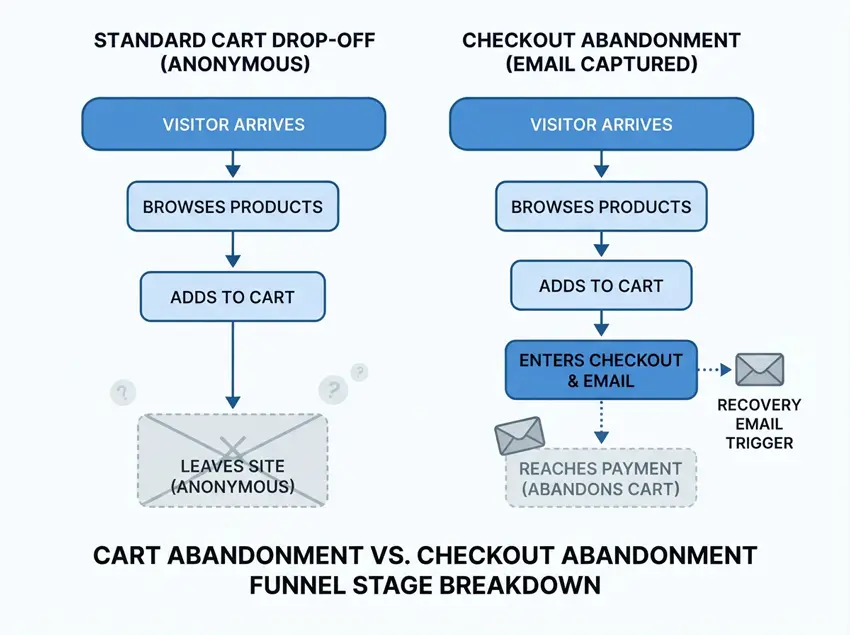
These two terms describe different problems, and treating them as the same thing leads to the wrong fixes.
Cart abandonment happens when a shopper adds products to their cart but leaves before clicking through to checkout. At this stage, Shopify typically doesn’t have the customer’s contact information, so direct recovery is difficult.
Checkout abandonment happens when a shopper starts the checkout process — entering their email or shipping address, but leaves before completing payment. Because the customer has provided contact details, Shopify can track this as an “abandoned checkout” and send a recovery email.
Shopify’s abandoned checkout feature only activates once a customer has entered identifying information (usually their email address). Shoppers who abandon the cart before reaching checkout don’t appear in your Abandoned Checkouts list.
Tracking both separately helps you understand where the bigger problem actually is — before or after the checkout button.
What Is a Normal Shopify Cart Abandonment Rate?
Baymard Institute currently reports an average ecommerce cart abandonment rate of about 70.22%, based on data aggregated from 50 studies. That means roughly seven out of ten shoppers who add something to a cart don’t complete the purchase.
This number is widely cited, but a few important caveats apply:
- It’s an industry average, not a target. Your store’s acceptable rate depends on your product type, price point, traffic source, and audience.
- Mobile is typically higher. Mobile shoppers experience more friction — smaller form fields, slower load times, fewer saved payment details — which leads to higher abandonment rates than desktop across most stores.
- Some abandonment is unavoidable. Baymard’s latest research found that 42% of U.S. shoppers had abandoned a cart simply because they were browsing or were not ready to buy. These shoppers weren’t going to convert regardless of how smooth your checkout was.
How to Calculate Your Cart Abandonment Rate
You can work out your own rate with this formula:
Cart abandonment rate = (1 − completed purchases ÷ carts created) × 100
For example, if 1,000 shoppers created a cart and 250 completed a purchase, your abandonment rate is (1 − 250/1,000) × 100 = 75%.
Shopify’s Analytics > Overview dashboard surfaces funnel-stage data directly, so you don’t need to calculate this manually. But knowing the formula helps you understand what the numbers actually mean.
The real question isn’t whether abandonment is happening; it always is, but whether your rate is significantly above what’s normal for your category, and where in the funnel the biggest drop-off occurs.
Why Do Customers Abandon Shopify Carts?
Unexpected Costs
This is the top cause across virtually every piece of research on cart abandonment. A shopper sees a product price, adds it to cart, gets to checkout, and then sees shipping fees, taxes, or handling charges that weren’t visible earlier. The total cost is higher than expected, and they leave.
Baymard Institute identifies extra costs: shipping, taxes, and fees as the number one abandonment trigger, cited by around 39% of shoppers in their research.
Complicated Checkout
Every unnecessary step between cart and purchase is an opportunity to lose a customer. Long forms, confusing page layouts, and too many distractions during checkout all increase the chance a shopper gives up.
Required account creation is a significant friction point on its own. Baymard’s research finds that around 19% of shoppers have abandoned because they were asked to create an account. Shopify supports guest checkout, but review your checkout settings to make sure account requirements aren’t creating unnecessary friction for first-time buyers.
Payment Limitations
If a shopper’s preferred payment method isn’t available, or they don’t see familiar, trusted payment options, they may not complete the purchase, especially on an unfamiliar store.
Unclear Shipping Information
Shoppers want to know when their order will arrive and how much it will cost before they commit to checkout. If your store doesn’t show delivery estimates, hides shipping costs until late in the flow, or has a hard-to-find returns policy, some shoppers will abandon rather than proceed with uncertainty.
Trust Issues
A shopper who doesn’t recognize your brand is asking several questions at once: Is this store legitimate? Is my payment secure? What happens if I need to return this? If they can’t find clear answers, they leave.
Missing or vague return policies, no customer reviews, no visible contact information, and unfamiliar payment processing all contribute to trust gaps.
Mobile Problems
Mobile shoppers abandon at higher rates than desktop shoppers. Small tap targets, forms that are difficult to fill on a phone, slow page loads, and layouts that don’t adapt well to narrow screens all make the checkout process harder on mobile.
Slow Store Experience
A slow cart or checkout page increases abandonment. This doesn’t mean speed alone determines whether someone buys, but noticeable delays — especially on mobile — reduce the chance a shopper completes the process.
Coupon Hunting
Some shoppers leave when they see a visible discount code field at checkout. They close the tab to search for a coupon online and don’t return. Baymard’s checkout UX research notes that discount-code fields can pull users away from checkout entirely. If your store doesn’t rely heavily on promotions, consider whether the discount field needs to be as prominent as it currently is.
Comparison Shopping or Low Purchase Intent
Not every abandoned cart signals a problem. Some shoppers are genuinely browsing, price-comparing across stores, or saving items they intend to buy later. Abandonment in these cases isn’t a conversion problem you can solve with checkout optimization — it’s a normal part of the buying cycle.
Which Cart Abandonment Can You Actually Reduce?
It helps to separate two types of abandonment before deciding what to fix.
- Unavoidable abandonment comes from shoppers who were browsing, not buying. They had no real intent, and no amount of checkout optimization would have converted them. Baymard estimates this accounts for roughly 42% of cart abandonments among U.S. shoppers.
- Preventable abandonment comes from shoppers who had genuine purchase intent but hit friction, unexpected costs, a complicated checkout, missing payment options, unclear delivery timelines, or trust gaps. This is where your optimization effort should go.
The distinction matters because it keeps you from optimizing against a baseline that can never reach zero.
How to Reduce Abandoned Carts on Shopify
1. Show Total Costs Earlier
The best solution to surprise costs is to eliminate the surprise. A few ways to do this:
- Add a shipping cost estimator to your product pages or cart page, so shoppers know what to expect before they click checkout.
- Display a free shipping threshold clearly. For example, “Free shipping on orders over $50,” so customers understand where they stand.
- If your store charges taxes, consider showing an estimated tax total in the cart rather than only at checkout.
Getting this right before checkout prevents a large share of avoidable abandonment.
2. Make Shipping Information Easy to Find
Shoppers want to know when their order will arrive and what the return process looks like. Make these easy to find:
- Show estimated delivery timeframes on product pages or in the cart.
- Link your shipping policy and returns policy in the footer and in the cart sidebar.
- If you offer free shipping above a threshold, display how much more a shopper needs to add to qualify.
A shipping bar that dynamically shows progress toward free shipping can help here. GP Free Shipping Bar does this: it gives shoppers clearer visibility into the free-shipping threshold as they browse, which can encourage them to consider adding another item to qualify.
3. Reduce Cart-to-Checkout Friction
On standard Shopify plans, deep checkout customization is limited. But there’s still meaningful friction you can reduce:
- Make the checkout button prominent and easy to find on the cart page.
- Avoid cluttering the cart page with excessive upsells, pop-ups, or distractions that pull attention away from completing the order.
- Make sure your cart page loads quickly and displays correctly on mobile.
- Avoid requiring customers to sign in unless your business model genuinely needs it. Review your checkout settings to make sure account requirements aren’t creating unnecessary friction.
4. Offer Relevant Payment Methods
Shoppers are more likely to complete a purchase when they see a payment method they recognize and trust. Shopify supports:
- Shop Pay Shopify’s accelerated checkout, which saves payment and shipping details for eligible returning shoppers, reducing the number of steps needed to complete a purchase.
- Credit and debit cards via Shopify Payments or third-party processors.
- Buy now, pay later options like Afterpay or Klarna, which can help with higher-priced items where sticker shock is a factor.
- PayPal, which many shoppers use as a default for unfamiliar stores because they trust the payment brand even if they don’t know yours.
- Local payment methods, depending on where your customers are located.
Don’t assume that adding more payment methods will automatically lift conversion — but missing a widely expected option can prevent purchases.
5. Improve the Mobile Cart and Checkout Experience
Mobile is where most stores lose the most shoppers. A practical checklist:
- Test your full checkout flow on a real phone, not just a browser preview.
- Check that all buttons and form inputs are large enough to tap accurately.
- Ensure form fields (name, address, card number) work correctly with mobile keyboards.
- Verify that accelerated checkout buttons (Shop Pay, PayPal, Apple Pay, Google Pay) are visible and functional on mobile.
- Check page load speed on mobile using Google PageSpeed Insights or a similar tool.
6. Improve Store Performance
A slow store increases abandonment. On Shopify, performance is largely driven by your theme, apps, and media files. Practical steps:
- Compress product images. Oversized image files can add significant page weight and are one of the first things worth auditing on most Shopify stores.
- Audit your installed apps. Some apps add storefront scripts or third-party resources that affect performance. Remove apps you’re not actively using and review any third-party code running on cart and checkout pages.
- Test your theme’s performance, especially on mobile. Shopify’s Online Store > Themes section surfaces basic speed data, and a deeper audit is worth doing periodically — Shopify page speed optimization covers the main levers available to merchants without custom development.
- Avoid third-party scripts that load unnecessarily on cart and checkout pages.
7. Build Trust Before Checkout
A shopper on an unfamiliar store needs to feel confident before they hand over payment details. Make sure the following are in place:
- A clear, easy-to-find returns and refund policy. If you haven’t added one yet, adding a shipping policy on Shopify is straightforward and makes a visible difference for first-time buyers.
- Accurate product descriptions, including sizing, materials, or compatibility where relevant.
- Customer reviews on product pages. If you don’t have reviews yet, prioritize collecting them.
- Visible contact information at minimum, a contact page or email address.
- A secure checkout experience. Shopify handles SSL and PCI compliance, but make sure your branding and messaging doesn’t undermine the confidence Shopify’s checkout provides. Trust badges can reinforce this, though they work best when the rest of the store already looks credible.
GroPulse Google Reviews lets you pull verified Google reviews onto your store. Google reviews can provide third-party social proof for shoppers who are unfamiliar with your brand.
8. Use a Free Shipping Threshold Carefully
A free shipping threshold can reduce abandonment by turning a hidden variable (shipping cost) into a predictable rule. Instead of discovering a $9 shipping fee at checkout, the customer knows upfront: spend $50 and shipping is free.
A few things to consider before implementing one:
- Calculate whether the margin on the additional items required to hit the threshold actually covers your shipping cost. Free shipping that consistently erodes your margin isn’t a solution.
- Display the threshold clearly across your store in the header, in the cart, and on product pages, so it actually influences behavior.
- Test different threshold amounts. A threshold set too high won’t change behavior; one set too low leaves money on the table.
9. Set Up Abandoned Checkout Recovery
Shopify includes built-in abandoned checkout recovery on all plans. The current setup path is:
Marketing > Automations > Create automation > Abandoned checkout template
The automation sends an email to customers who reached checkout and entered their email address but didn’t complete the purchase. You can customize the email content, subject line, and timing from within the automation editor.
A few things to understand about how this works:
- Shopify only sends recovery emails to customers who provided their email during checkout. Shoppers who abandoned before entering contact details aren’t reachable through this feature.
- By default, the automation may send only to customers subscribed to email marketing. You can edit the recipient settings within the automation to include all customers who abandoned checkout.
- Checkout attempts flagged as suspected card testing or bot activity are excluded from the abandoned checkout list.
Shopify is transitioning abandoned checkout recovery to Marketing > Automations. Stores that haven’t migrated yet may still see a legacy abandoned checkout setting under Settings > Checkout. Once you opt into the new automation, you can’t switch back to the legacy version.
10. Build a Better Recovery Email Sequence
Shopify provides an abandoned-checkout automation template that can be customized — including the wait time and email content. Stores that need more advanced segmentation, multi-channel sequences, or detailed performance tracking often use a dedicated email platform like Klaviyo or Omnisend, both of which integrate directly with Shopify.
There’s no universal send time that works for every store, but a practical starting framework looks like this:
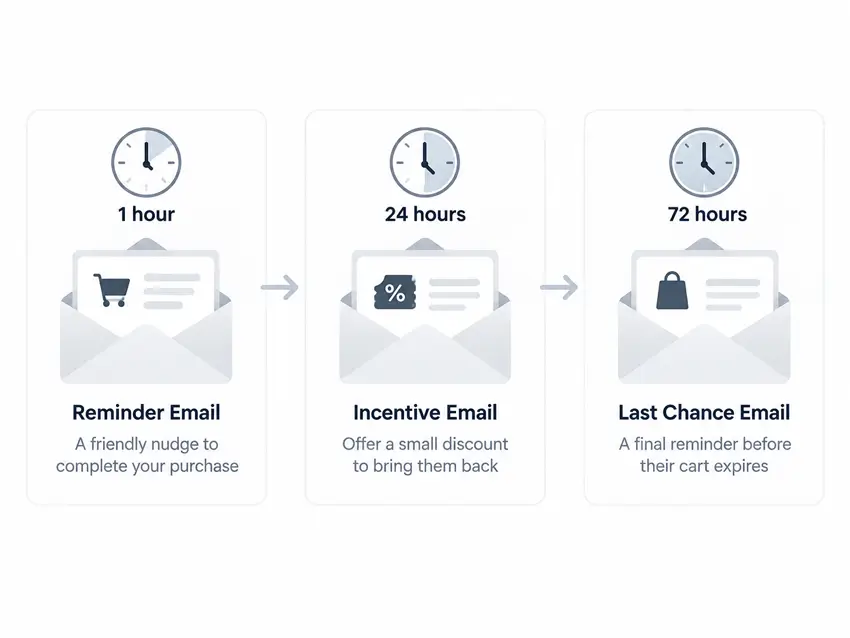
Email 1 – a few hours after abandonment: A simple reminder with the items left in the cart and a direct link back. No discount needed at this stage. Many shoppers simply got distracted and will return with a straightforward nudge.
Email 2 – around 24 hours later: Address likely hesitations. If your product has common questions — sizing, materials, compatibility — this email is a good place to answer them. A customer review or a brief mention of your return policy can help.
Email 3 – 48–72 hours later: A final message. A modest discount or free shipping offer can make sense here if your margins allow it, but use it selectively. Offering a discount on every abandoned cart trains some shoppers to abandon on purpose.
Test timing against your own recovery data. What works depends on your product, your audience, and how quickly purchase decisions are typically made in your category.
Avoid leading with discounts. It reduces your margin on customers who would have purchased anyway.
11. Use Retargeting Carefully
Retargeting ads on Meta (Facebook and Instagram) or Google can reach shoppers who visited your store or added something to cart but didn’t convert. This is one of the few tactics that can reach cart abandoners who didn’t provide their email.
To do this effectively, you need:
- A properly configured Meta Pixel or Google Ads conversion tag on your Shopify store.
- Correct event tracking so that “add to cart” events are firing accurately.
- Proper consent management, particularly for visitors from regions with privacy regulations.
Pixee – Multi Pixel & Meta Ads simplifies installing and managing multiple Meta Pixels on Shopify without requiring code edits.
Retargeting works best as part of a broader recovery strategy, not as a standalone fix. ROAS will vary significantly based on your product, price point, audience quality, and creative. Don’t expect predictable results from day one.
12. Measure and Test
The most important thing you can do before implementing any of the above is understand where your shoppers are actually dropping off. These are the funnel metrics to track:
- Add-to-cart rate: What percentage of product page visitors add an item?
- Reached checkout rate: Of those who added to cart, how many clicked through to checkout?
- Completed purchase rate: Of those who reached checkout, how many paid?
- Mobile vs. desktop conversion: Are the rates dramatically different? Mobile problems are often the biggest opportunity.
- Recovery email performance: Open rate, click rate, and recovered order rate from your abandoned checkout automation.
In Shopify admin, the Analytics > Overview dashboard shows conversion funnel data. The Orders > Abandoned Checkouts section shows you recent abandoned sessions with timestamps, so you can look for patterns (e.g., high abandonment at a specific time, or on a specific device).
Fix the stage with the largest drop-off first. Don’t start optimizing email subject lines if your cart-to-checkout rate is the real problem.
Where Are Shoppers Dropping Off?
Use this table as a starting diagnostic. Match the drop-off point to a likely problem and know what to check first.
| Drop-off point | Likely problem | What to investigate |
|---|---|---|
| Product page → Cart | Low intent, pricing concerns, unclear product information | Product page copy, images, pricing visibility, reviews |
| Cart → Checkout | Shipping surprise, confusing cart UX, weak CTA | Shipping cost visibility, cart page layout, mobile usability |
| Checkout → Payment | Form friction, payment options, delivery uncertainty | Checkout flow, available payment methods, shipping estimates |
| Payment → Purchase | Payment failure, trust concern, final cost shock | Review payment events in abandoned checkouts for card declines, address mismatches, 3-D Secure failures, expired cards, inventory issues, or invalid discount codes |
What Should You Fix First?
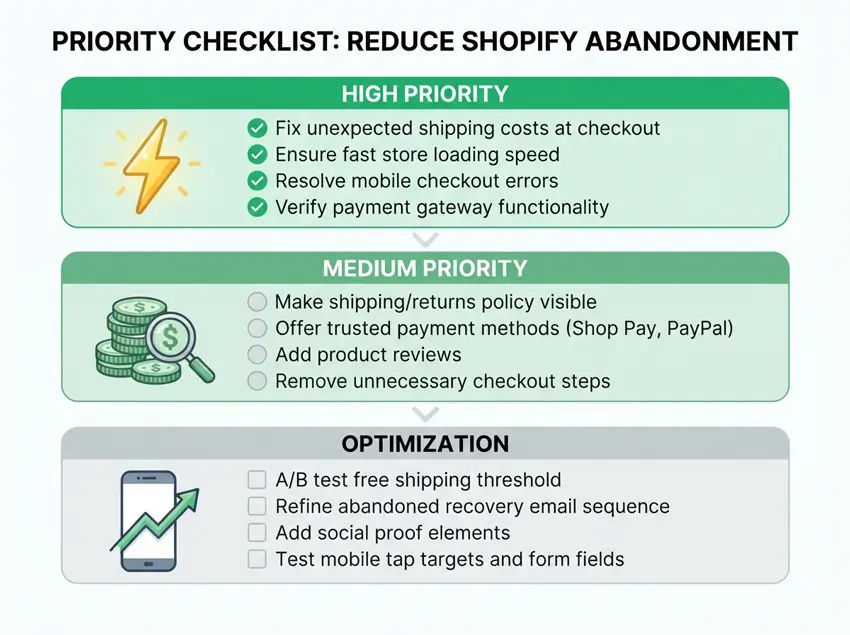
Not all fixes have the same impact. Work through this order:
Fix these first (high impact, often quick):
- Unexpected shipping costs appearing only at checkout
- Broken or misconfigured payment methods
- Checkout errors or blank pages on mobile
- Obvious mobile usability problems (small buttons, broken forms)
- Store loading slowly enough to be noticeable
Address these next (meaningful impact, more effort):
- Shipping cost and delivery information that’s hard to find
- Missing trust signals (returns policy, reviews, contact info)
- Payment methods shoppers in your market expect
- Abandoned checkout recovery automation not yet set up
Optimize once the basics are solid:
- Free shipping threshold strategy
- Recovery email sequence beyond one email
- Social proof and urgency elements
- Retargeting campaigns
- Upsells and bundle offers
The principle is simple: fix friction before adding persuasion. Urgency tactics and discount codes don’t convert shoppers who couldn’t figure out what shipping would cost.
Practical Shopify Cart-Abandonment Example
This is a hypothetical scenario, not a real case study.
A Shopify apparel store is seeing strong traffic and good add-to-cart activity, but a significant portion of shoppers who reach checkout don’t complete the purchase.
Here’s how the merchant might investigate and respond:
- Check the funnel in Analytics > Overview: The drop is largest between “reached checkout” and “sessions converted.” This confirms the problem is happening inside the checkout flow, not at the cart stage.
- Check payment events in abandoned checkouts: Going to Orders > Abandoned Checkouts and reviewing payment events reveals several sessions with card decline errors. Others show no error; the shopper simply dropped off at the shipping step.
- Investigate shipping costs: The store charges a flat $8.99 shipping fee that only appears after the shopper enters their address. For many customers, this is the first time they see the total cost and some leave at that point.
- Fix the most likely causes: Make the shipping cost visible on the cart page before checkout begins. If the rate varies by location, show a shipping estimator or a clear note explaining how costs are calculated. For the payment declines, confirm payment gateway settings are correct and that the checkout is displaying clear error messages.
- Enable Shop Pay: Returning shoppers with saved details can skip most of the form steps, which reduces drop-off for this segment.
- Set up the abandoned checkout automation: Go to Marketing > Automations, add the Abandoned Checkout template, customize the email content, and turn it on.
- Measure the result: After two to three weeks, compare the checkout-to-purchase rate against the prior period, and check whether payment event errors have decreased.
This sequence identify the drop-off stage, investigate the specific cause, fix it, then recover remaining abandoners is more effective than adding features or tactics before you understand what’s actually happening.
Common Cart-Abandonment Mistakes to Avoid
- Discounting too quickly: Offering a discount in the first recovery email, or on every abandoned cart, trains customers to abandon on purpose. Use incentives selectively.
- Hiding shipping costs until checkout: This is the single most consistent driver of abandonment across the research. There’s no good reason to reveal costs late.
- Installing too many apps: Some apps add storefront scripts that affect load times. Audit your app list regularly and remove anything you’re not actively using — the performance impact of unused apps isn’t always visible until you look for it.
- Adding fake urgency: “Only 2 left!” on a product that’s always in stock, or countdown timers that reset, damage trust more than they help. Shoppers recognize fake scarcity.
- Relying only on recovery emails: Recovery emails reach only shoppers who provided an email address during checkout. Most cart abandoners never reach that point. Recovery is a supplement to prevention, not a replacement.
- Optimizing persuasion before fixing broken steps: If there are errors, confusing layouts, or missing payment options, adding social proof widgets or urgency banners won’t move the needle.
Frequently Asked Questions
What is a good cart abandonment rate for a Shopify store?
Baymard Institute currently puts the global ecommerce average at around 70.22%, aggregated from 50 studies. If your store is significantly above that, look for specific friction in your checkout flow. Rates vary by product type, price point, and traffic source, so treat benchmarks as context rather than fixed targets.
Does Shopify automatically send abandoned cart emails?
Shopify includes built-in abandoned checkout recovery, but you need to activate it. Go to Marketing > Automations in your Shopify admin, create an automation using the Abandoned Checkout template, and turn it on. It only triggers for shoppers who entered their email address during checkout.
How soon should I send an abandoned checkout email?
There’s no single timing that works for every store. A common starting point is sending the first email within a few hours of abandonment, while the purchase is still fresh. Follow up around 24 hours later, and again at 48–72 hours if you’re running a sequence. Test timing against your own recovery data — your product and audience will determine what works.
What’s the difference between an abandoned cart and an abandoned checkout on Shopify?
An abandoned cart is when a shopper adds a product but never starts checkout. Shopify has no contact information for them. An abandoned checkout is when a shopper enters their email or address but doesn’t pay, Shopify records this and can send a recovery email. Only abandoned checkouts appear in your Orders > Abandoned Checkouts list.
Does free shipping reduce cart abandonment?
It can, especially when shipping costs are the main reason shoppers leave. But free shipping isn’t automatically profitable. Set a free shipping threshold that covers your shipping cost through the margin on the additional order value needed to qualify, and communicate the threshold clearly before checkout.
Can I see abandoned carts on Shopify?
You can see abandoned checkouts (shoppers who started checkout) under Orders > Abandoned Checkouts in your Shopify admin. Shoppers who added to cart but never started checkout don’t appear here — Shopify needs a contact point (email) to record a session as an abandoned checkout.
Why do shoppers abandon carts even when prices are fair?
Price is one factor, but not always the deciding one. Common non-price causes include unexpected shipping costs, mobile checkout usability problems, missing trust signals, limited payment options, and low purchase intent (browsing, not ready to buy). Fixing the checkout experience often matters more than adjusting prices.
Final Thoughts
Cart abandonment is a permanent feature of ecommerce, not a problem you eliminate, but one you can meaningfully reduce. The most effective approach is straightforward: find where shoppers are dropping off, fix the biggest friction point first, and then layer on recovery tactics for shoppers who still leave.
For most Shopify stores, the starting point is the same: make shipping costs visible before checkout, confirm your mobile checkout works properly, and turn on the abandoned checkout automation in Marketing > Automations.
That foundation addresses the highest-impact issues before you spend time on more complex tactics. Reducing abandonment is one piece of a broader effort to increase Shopify sales, but it’s often the piece with the fastest payoff, because the traffic is already there.
Once that’s in place, use your analytics to see what’s actually happening in your funnel — and let the data tell you what to fix next.